
Interview help
You're invited to an interview on Flowmingo
A company has invited you to a Flowmingo interview. This guide explains what to prepare and what happens before, during and after it.
You'll also learn which offers are optional, and how to submit without paying.
Quick answers
- Do I have to pay?
- No. Submitting is free. Paid practice and improvements are optional.
- How much time should I allow?
- The company sets the length. Check the duration in your invitation, then add time for the steps before and after.
- Can I use my phone?
- For an AI interview, yes, though a computer is better. A Technical Test or a Showcase needs a laptop or desktop.
- Does my link expire after 48 hours?
- No. That timing is a suggestion, not an expiry.
- Who makes the hiring decision?
- People at the company, not the AI.
- What if I lose my connection?
- Reopen your invitation link and press "Resume Interview".
Why did Flowmingo send me an invitation?
The company uses Flowmingo for its interviews and sends you the invitation through it. The email comes from Flowmingo "on behalf of" the company, and its subject starts with the company's name, then "Interview invitation for", the role and your name.
FromFlowmingo, on behalf of AtlasPeak
SubjectAtlasPeak: Interview invitation for Digital Marketing Specialist - Linh Tran
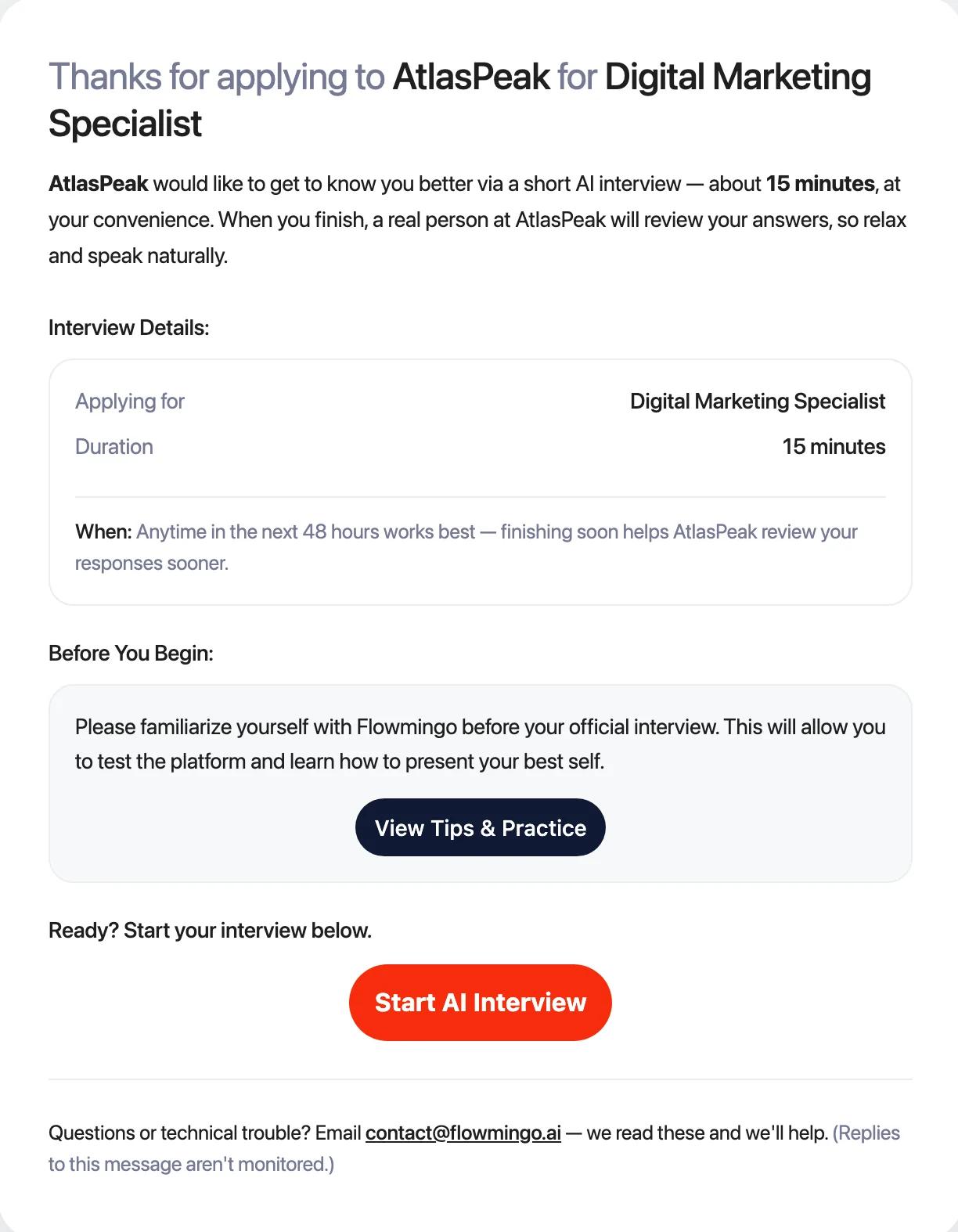
Look for the role under "Applying for", the duration, and any notes from the company. The email also says a real person at the company will review your answers.
Your invitation has 2 buttons, "View Tips & Practice" and "Start AI Interview". Some companies also send it on WhatsApp, with Practice and Start buttons.
Replies to the invitation email are not read. Ask the company about the job or the role. For a problem with the platform, email contact@flowmingo.ai.
Do I have to finish within 48 hours?
The email says "Anytime in the next 48 hours works best". This is a suggestion. Your AI interview link has no expiry date.
The link stops working only if the company removes or archives the interview. You'll then see "This interview link is no longer active", and only the company can reopen it.
You may get up to 2 reminder emails, about 2 and 4 days after the invitation. They stop once you start.
What should I prepare?
- Find somewhere quiet. The company sets the length, shown as the duration in your invitation. Add time for the steps before and after. On Flowmingo the most common length is 25 minutes, and most people take 24 to 42 minutes in total.
- Check what the company sent. A Technical Test or a Showcase only works on a laptop or desktop. For an AI interview, use a computer with Chrome if you can. Phones work, but 86% of interviews started on a laptop are finished, against 68% on a phone.
- Open your link in Chrome or Safari, not inside WhatsApp, LinkedIn, Facebook, Instagram, Telegram, Zalo or the Gmail app. Those in-app browsers can't use your camera and microphone.
- Have your CV ready as a PDF, DOC or DOCX, in case the company asks for it. The upload is skipped if Flowmingo already has your CV.
- Sign in with the email address that received the invitation. Everyone invited to the same interview gets the same link, and signing in is how you are identified.
What happens before the interview starts?
Some steps appear only if the company added them. In order, you will
- 1Choose your language. The company decides which of our 46 interview languages you can pick. Then press "Begin".
- 2Sign in or create your account, with an email and password, Google or Microsoft. A new account needs your name, email, a password and a 6-digit code we email you. Some company-branded interviews only ask for your name, email and a code.
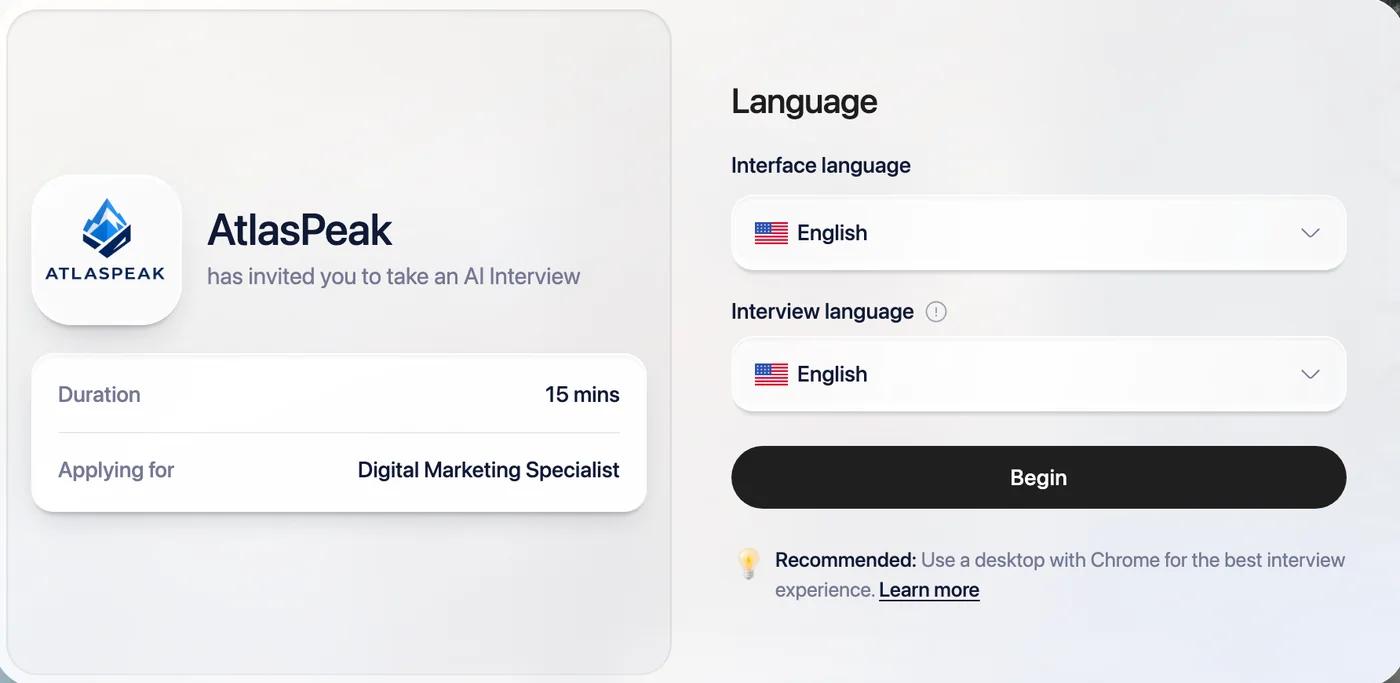
- 3Watch the company's welcome message, if it recorded one ("A quick message from the hiring team").
- 4Watch "Interview Instructions", a short video with captions that explains how answering works.
- 5Answer any screening questions. They may ask for text, a multiple-choice answer, or a file such as your CV.
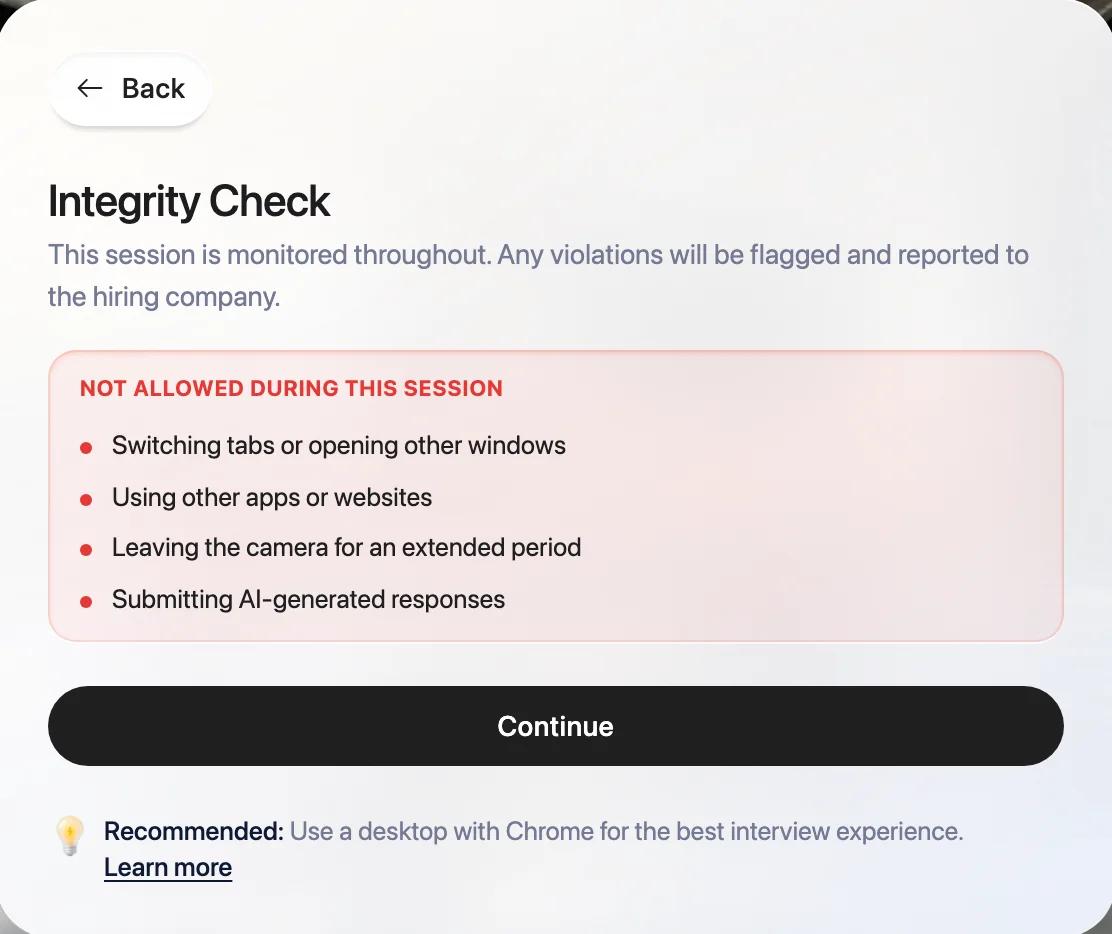
- 6Read the "Integrity Check". The session is monitored, and anything flagged is shared with the company. Don't switch tabs or windows, use other apps or sites, or leave the camera for a long time. Submitting AI-generated answers is not allowed.
- 7Choose whether to practice. At "Get familiar with AI interview", pick "View Tips & Practice" or "Start Actual Interview". The "Quick Walkthrough" is free. "Premium Practice" adds scoring and feedback and costs US$2.90 to US$7.90 depending on your country, paid once. If the company paid for your practice, it is free for you.
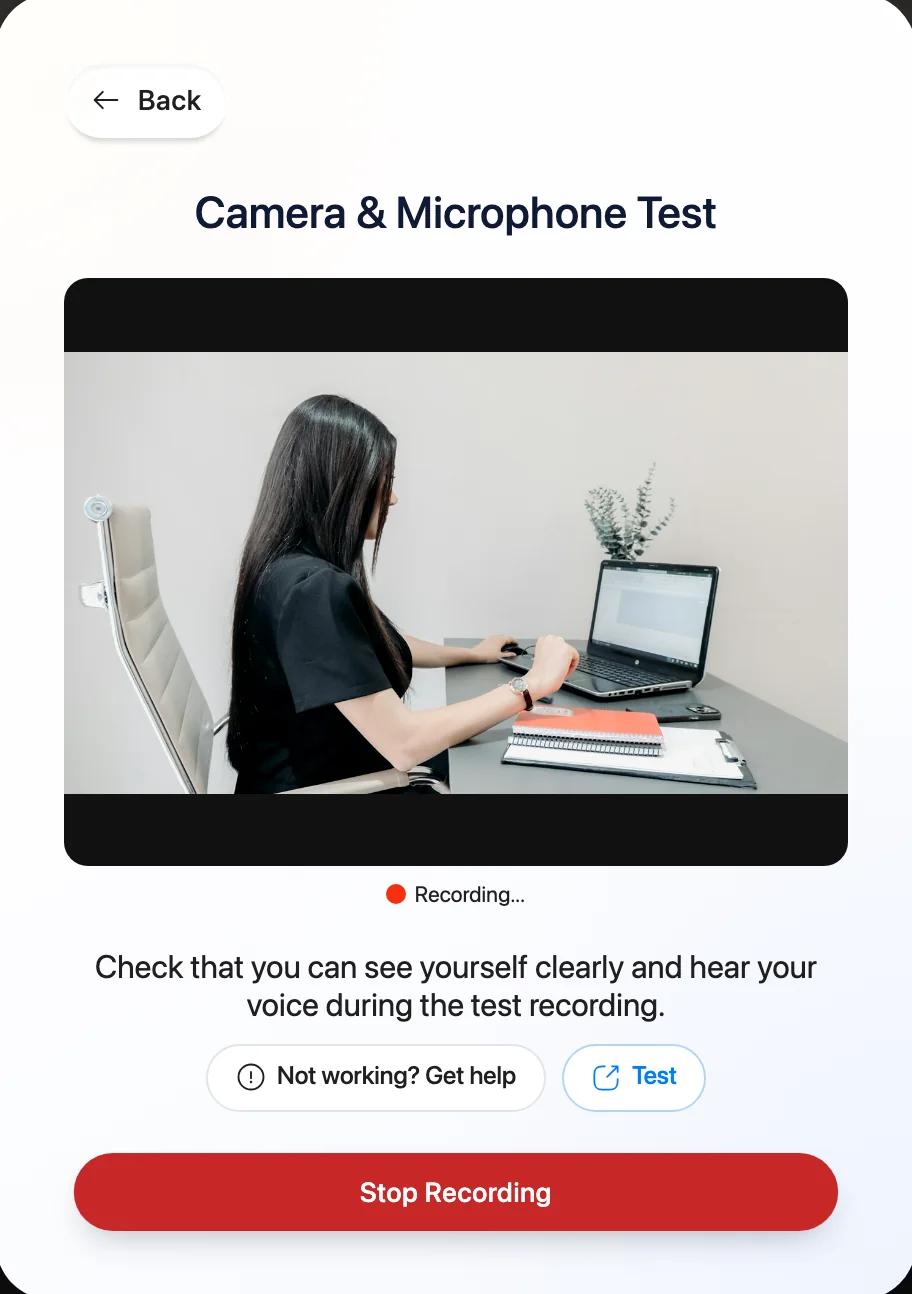
- 8Check your camera and microphone in "Check Audio and Video". Press "Grant Access" and allow both when your browser asks. Pick your microphone, say something, and check that the bars turn green. Press "Test Speaker", then choose your camera.
At sign-up you may see an unticked box offering a free CV Evaluation in exchange for contributing de-identified data. It is optional. You don't need it for your account or your interview.
On a slower device, we may switch to "Essential Interview Mode". The AI reads the questions but doesn't talk back to your answers.
How do I answer the questions?
The AI reads each question aloud and shows it as subtitles. You can change how fast it speaks, from 0.5x to 2x, and switch the language for the questions that follow.
In most interviews, for each question you
- 1Press to start your answer.
- 2Answer on camera, for at least 5 seconds.
- 3Press "Submit your response" when you're done.
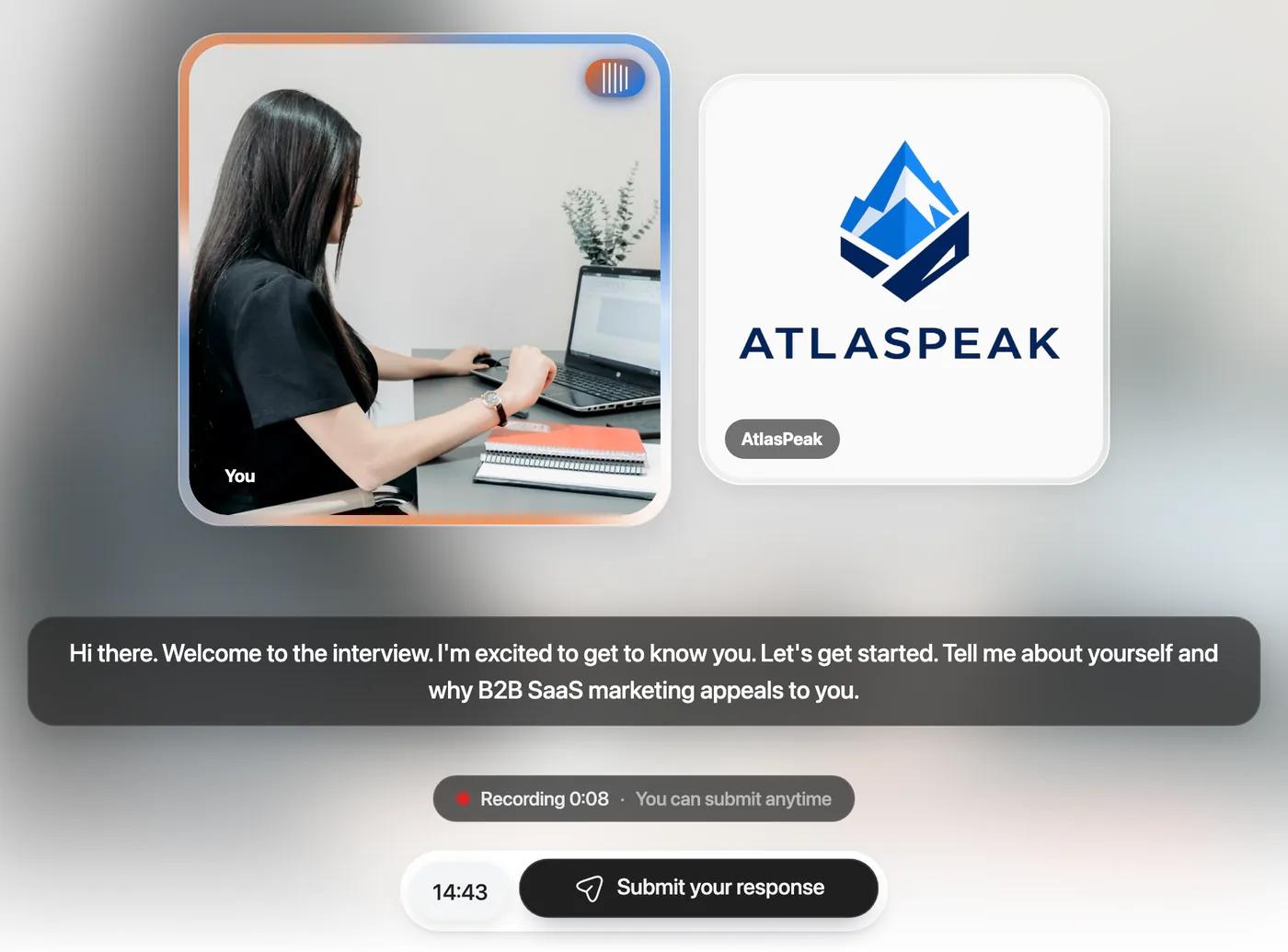
After 2 minutes you'll see "Submit to continue". Each answer stops at 10 minutes, with a countdown in the last minute. A typical answer takes about 1 minute.
Some companies use a live conversation instead. There is no record button. You speak, then pause when you've finished.
If you gave a CV, the AI usually starts with at least 2 questions about it. Then it asks the company's questions. It may ask a follow-up, or rephrase a question if your answer was unclear, but it never asks the same question more than twice. A blank answer gets the question again.
Companies set about 12 questions. With follow-ups, people answer about 14, and most answer between 6 and 22.
What if I run out of time or need to stop?
There is 1 overall timer, with warnings at "10 minutes left" and "5 minutes left". The clock pauses while your answer is being processed. There is no replay button and no pause.
Not reaching every question is normal. 58% of interviews end when the time runs out, and the AI skips some questions your earlier answers already covered.
"End Interview Early" becomes available after 70% of your time. It submits the remaining questions blank and tells the company you ended early. You can't undo it.
If your connection drops or the tab closes, reopen the same link and press "Resume Interview". You continue where you stopped, with your remaining time, and your recorded answers are kept.
How do I submit without paying?
After your last question you'll see "Time left to finalize". You have 2 hours to review before your interview is sent automatically. The company sees your answers only after you submit, or when those 2 hours end. You don't have to wait.
- 1If your submit button says "1 Improvement", you added a paid improvement. Remove it.
- 2Press "Submit Interview".
- 3An offer for your own detailed report appears. Choose "No thanks. Just submit".
- 4Look for "Interview Submitted Successfully".
The company never needs you to pay to see your interview. Closing the tab doesn't cancel it either. Your interview is sent automatically when the 2 hours end. If you see "Uploading in progress", keep the tab open until it finishes.
What are the optional paid offers?
In those 2 hours you may see offers to retake an answer, answer a question you missed, or polish your video. You can also buy your own detailed report. Each costs US$2.90 to US$7.90 depending on your country, shown in your local currency where we can.
- An answer can have up to 4 takes. Only your best take goes to the company.
- Buying your report or a video polish doesn't change your score. A retaken answer is a new answer, and it is scored like any other.
- The company is not shown whether you bought anything.
- Companies can switch retakes off. If the company sponsored your interview, or it carries the company's own branding, you won't see paid offers.
Almost everyone just submits. About 0.5% of interviews were retaken.
What happens after I submit?
We send you 1 email confirming your interview was shared with the company. It is not a hiring result or a job offer. The company contacts you directly if it moves forward. Flowmingo never sends hiring decisions.
In your Flowmingo account, the interview moves through "Invited", "Started" and "Submitted". You'll see "Company viewed your submission" once the company opens it.
Your score and report aren't shown to you by default. You see them if you buy your report, or if the company chooses to share it.
You can't restart the whole interview yourself. If something went wrong, ask the company. It can give you a new attempt for free with "Allow retake", and your first attempt is kept. Open the link with the same email address.
What people say after their interview
Everyone can rate their interview when they finish. Since July 2026, 10,084 people did, with an average of 8.1 out of 10. These are 3 of them, in their own words.
“It was being my first AI interview, haven't really felt it was a system asking questions, the communications was really acceptable”
“Great experience. The interface is clean, user-friendly, and the interview process worked perfectly.”
“It's a great experience as a fresher. I really enjoyed the session. Thanks!”
What if my invitation is for a test instead?
Check what you were sent before you choose a device.
AI interview
What you doAnswer the AI's questions on camera.
On a phone?Yes. A computer is recommended.
Role-play
What you doThe AI plays a character, such as a customer, and you respond in your role.
On a phone?Yes. A computer is recommended.
Skill Test
What you doAnswer timed multiple-choice questions, with your camera and microphone on.
On a phone?Yes.
Technical Test
What you doWrite code in the browser, sometimes with multiple-choice questions.
On a phone?No. Use a laptop or desktop.
Showcase
What you doRecord short tasks with your screen and camera. The company reviews them.
On a phone?No. Use a laptop or desktop.
Questionnaire
What you doAnswer written questions. No account needed.
On a phone?Yes.
A bundle puts several of these in order under 1 link. Parts that need a computer say "Needs a computer". Skill Tests, Technical Tests and Showcases have their own timing and recording rules, explained in our help article.
Stuck right now?
Find your problem and the exact steps to fix it. For a platform problem, press "Need help?" in your interview or email contact@flowmingo.ai. Ask the company about the job, an inactive link or a new attempt.