
You are 1 click from Post without promoting, and the screens before it decide who applies. You can learn how to post a job on LinkedIn in 8 clicks, and LinkedIn's help lists every one.
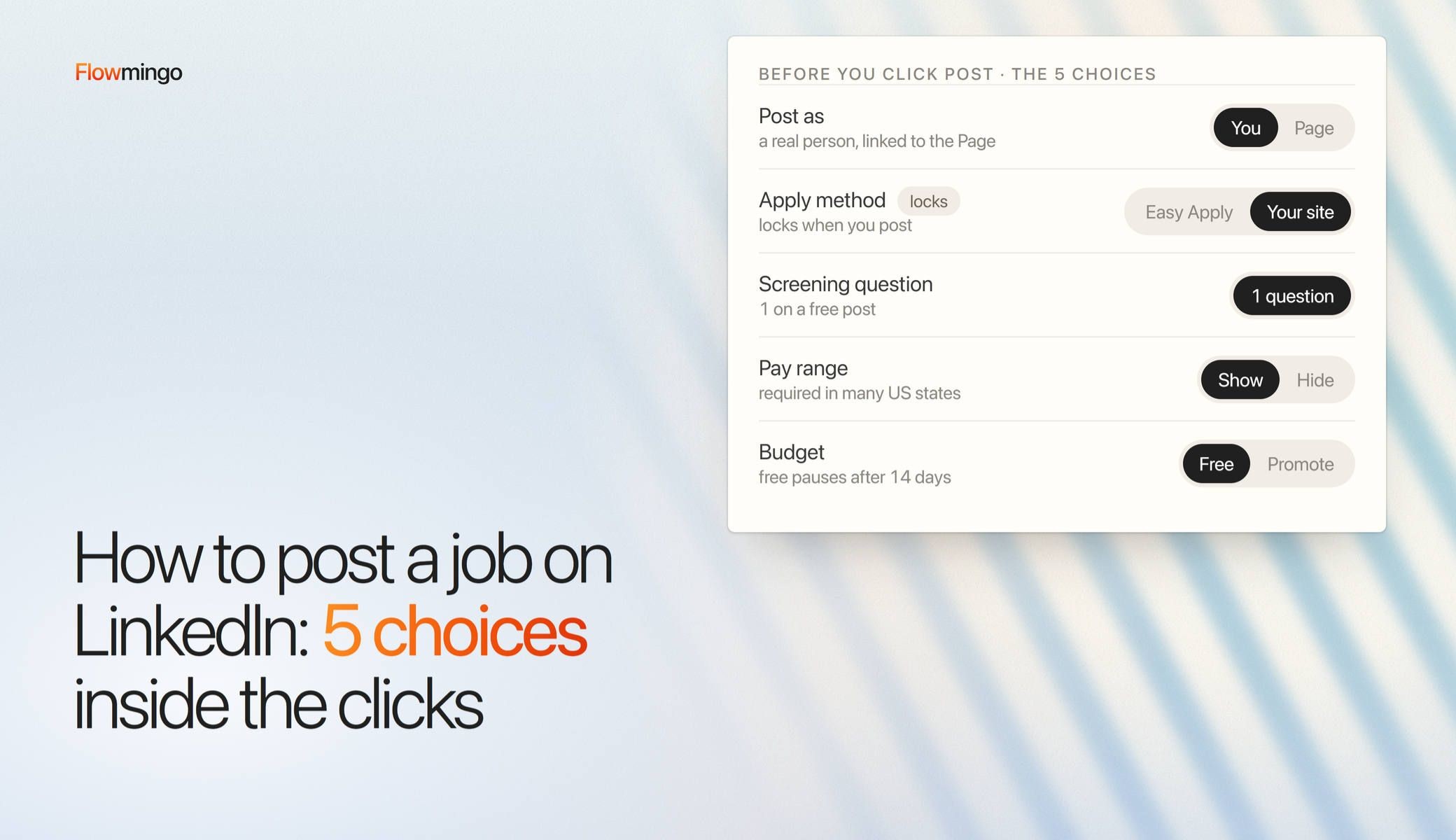
What the help skips is the choices inside those clicks. Your free LinkedIn job posting pauses after 14 days or 10 to 30 applications. It gets 1 screening question, and its apply method locks when you post.
Get those choices wrong and the first 10 to 30 applicants are the only ones you get, or you drown once you pay to promote. In a foundational 2024 thread, 1 first-time poster who paid to boost an assistant role got 1,480 applications in 2 days, with no filter (r/humanresources).
You fix it in 3 moves. Set up the Page and your account 2 weeks early, make the 5 choices before you press Post, and plan the screen before applicants arrive.
Key takeaways
- How many free LinkedIn job posts do I get? 1 active at a time. It pauses after 14 days or 10 to 30 applications, and restarting it needs promotion.
- Can I post the job as my company instead of myself? No, a real person posts and links the job to the Page. Only that 1 poster has full access to Easy Apply applicants unless they add coworkers.
- Should I use Easy Apply or my own apply link? Your pick of the 2 apply methods locks when you post, so choose the external website if you screen outside LinkedIn.
- Can my hiring tool sync with LinkedIn Jobs? For most tools, no. LinkedIn's Job Posting API takes 0 new partners, so point the apply link at your screening page.
- How do I stop a promoted job running up a bill? Set a total budget, because there is no pause button. LinkedIn's own example is $10 a day for 30 days, $300 or less.
1. How to post a job on LinkedIn for free, step by step, in 2026?
Click Jobs, then Post a free job, add the title and description, set Job settings, and choose Post without promoting. The job must link to your company Page, and you get 1 free post at a time.
Before step 1, list 3 to 5 outcomes the hire must deliver in the first year, our suggestion for 1 role. The foundational hiring book Who uses 3 to 8, ranked by importance. The description and the 1 free question come from that list, so keep must-haves to 2 or 3.
The 8 desktop clicks, checked against LinkedIn's Post a free job and Post a job pages on 8 Oct 2026:
- Click the Jobs icon at the top of your LinkedIn homepage.
- Click Post a job, or Post a free job.
- Recruiter customers only: click Continue next to "Your Name's LinkedIn Job Posting".
- Enter the job title and click Continue.
- Click Draft with AI, or paste your own description from the template below.
- Click Continue.
- On Job settings, set the screening question, rejection settings, how you manage applicants (this locks), an email for updates and the #Hiring frame.
- Click Continue, then Post without promoting, or Promote.
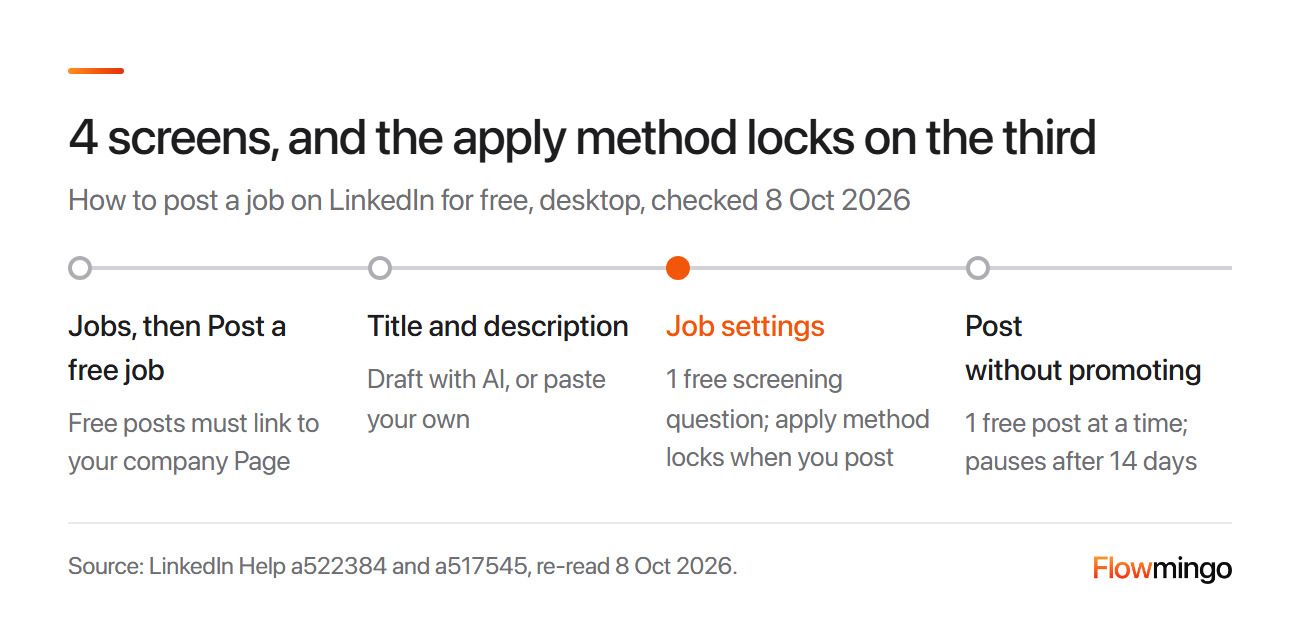
Free post path: the 8 clicks fold into 4 screens. Job settings holds the apply method and your 1 free screening question (LinkedIn Help, 8 Oct 2026).
In the figure, slow down on the highlighted Job settings screen, because the apply method locks there.
Edit LinkedIn's AI draft against this template from our job description guide:
| Line | Template | Illustrative example, not customer data |
|---|---|---|
| Title | [Job title] ([hours], [city or Remote]) | Bookkeeper (part-time, Singapore) |
| What you will do | [3 to 5 outcomes for the first year] | Close each month by day 5. File GST returns on time. |
| You will need | [2 or 3 real must-haves only] | 2 years of bookkeeping. Month-end close in Xero. |
| Pay | [Range, currency and period] | S$2,200 to S$2,800 a month |
| How to apply | [Easy Apply, or your link and its length] | Through the link, about 10 minutes |
2. How to post a job on LinkedIn from a company page, and do I need one?
You need a company Page, but you cannot post as the Page. A real person posts from their own account and links the job to the Page.
LinkedIn Help requires a member account and adds that "Applicants are only visible to the member who posted the job and selected to collect applicants through LinkedIn."
This means the poster holds the pile. Only they have full access, though they can add coworkers from the job management page (LinkedIn Help).
So post from the person who will run the hire. For example, if an office manager posts and then goes on leave, the hiring manager cannot open the pile unless added.
Create the Page first, under your real company name. A generic name such as "Confidential Company" may force paid promotion (LinkedIn Help and generic Pages FAQ, both foundational 2024).
Verify your work email too, as LinkedIn is piloting job badges that "cannot be bought or paid for" (LinkedIn Help).
If LinkedIn lacks trust signals on your account, it may ask for an ID check before you post (LinkedIn Help). It asked 1 founder's fresh profile on r/recruiting at once, so set the account up 2 weeks early (section 6).
2.1 Why isn't my job showing on my company page or in search?
Usually the job is still in review, or it has faded. LinkedIn's #Hiring help page says a new job may need a review, and free posts "become less visible in search results over time" (LinkedIn Help).
3. How to post a job on LinkedIn without notifying my network or showing my profile?
You can keep your face off the job by turning off the #Hiring frame. You cannot reliably stop LinkedIn telling your 1st-degree network that you posted.
LinkedIn says that when you post, "we'll notify your coworkers and close connections in your 1st-degree network" (Post a job). That notice is the default, and LinkedIn lists no switch for it.
The 1 official control is the #Hiring frame. Opt out of it when you post, and your profile does not appear on the job details page (LinkedIn Help).
In practice, the notice may still go out. A founder on r/recruiting in July 2025 was setting up a job from a Company Page with profile-update sharing and the #Hiring badge both off. LinkedIn still warned: "We'll notify your network that you're hiring, but we will not feature your profile on this job".
Nobody in the thread proved otherwise, so treat it as 1 anecdote.
Our suggestion for a confidential search: have a colleague outside the circle post it, with an external link to your screening page (section 6). Applicants then land with you, not with the colleague. Or skip LinkedIn.
4. Do I have to put the salary range on my LinkedIn job post?
LinkedIn lets you add pay but does not make it mandatory for most posters. Some laws do, and a LinkedIn post is a job ad, so put the range in it.
This is general information, not legal advice. The table links each official source:
| Where the role is | Who is covered | What the post must show |
|---|---|---|
| New York City | Employers with 4+ employees | A good-faith pay range in all job ads, online too |
| New York State | Employers with 4+ employees | A pay range for advertised jobs |
| California | Employers with 15+ employees | The pay scale in any job posting |
| Colorado, Washington, Illinois and more | Colorado: every posting. Washington and Illinois: 15+ employees | A pay range and benefits. Our job description guide lists more states by date |
| European Union | Employers, once their country's law is in force | Pay or a range in the ad or before the interview |
| Singapore (Employment Pass roles) | Employers applying for the pass, unless exempt (for example, under 10 employees) | On MyCareersFuture, not LinkedIn: a visible salary range, top at most 2 times the bottom, open 14+ consecutive days |
New York City's rule, a foundational 2022 law still in force, covers a team of just 4. California's also binds a third party that posts for you, with fines of $100 to $10,000 per violation. Singapore's Fair Consideration Framework sets the same 14 days for S Pass roles.
The foundational 2023 EU directive also bans pay-history questions, and several countries missed the June 2026 deadline, so check your own country's law.
LinkedIn's own pay field is weaker than the law. Only enterprise admins in the US can make salary required, and LinkedIn says this pay feature "is being deprecated and may no longer be available" (LinkedIn Help). So write the range in the description too.
Pay helps anyway: in a foundational 2022 LinkedIn survey of 1,193 US members, 91% said a range would affect whether they apply.
For example, the bookkeeper template above says S$2,200 to S$2,800 a month, inside Singapore's 2-times cap, so nobody applies blind.
5. Which 1 screening question should I add to my free LinkedIn job post?
A free post gets 1 screening question, so spend it on your single real deal-breaker. Mark it Must-have, and decide whether LinkedIn should auto-archive anyone who fails it.
LinkedIn Help says every job from a personal member account "includes one free screening question", and more need promotion. It also warns: "LinkedIn does not prevent unqualified applicants from applying."
LinkedIn offers 13 types. The best free deal-breakers are facts an applicant can answer truthfully in 1 click: Location, Work Authorization, Visa Status, Certifications and Hybrid Work.
For example, a warehouse shift role lives or dies on the commute, so Location beats any skill question. Experience types such as Expertise with Skill invite a yes from everyone, so score those later. Language is self-rated, so never auto-archive on it.
Here is 1 question per role, an illustrative example, not customer data:
| Role | Question type | The question | Must-have answer |
|---|---|---|---|
| Shift worker | Location | Can you commute to [site] for shifts starting at [time]? | Yes |
| Bookkeeper | Hybrid Work | Can you work on site in [city] 2 days a week? | Yes |
| Registered nurse | Certifications | Do you hold a current [licence] for [country]? | Yes |
| Remote support | Language | What is your level of [language]? | Professional or above, without auto-archive (self-rated) |
| Retail assistant (no sponsorship offered) | Work Authorization | Are you legally authorised to work in [country]? | Yes (ask only where lawful) |
Never ask about age, sex, race, a nationality preference or current pay. Singapore's TAFEP lists phrases such as "Below 30 only" as unacceptable. Auto-archive emails a rejection to anyone who fails, so use it only for a true pass/fail fact.
Ad law covers screening questions too. US Title VII bars job notices that show a preference by race, colour, religion, sex or national origin (42 USC 2000e-3). Its only exception is a narrow genuine job requirement based on religion, sex or national origin, never race or colour.
Set it before you post, as our pre-screening interview questions guide explains.
6. Should I use LinkedIn Easy Apply or send applicants to my own apply link?
Use Easy Apply if LinkedIn will be your only inbox, and an external link if you screen anywhere else. Decide before you post, because the choice locks.
LinkedIn Help lets you "route candidates to an external website", such as an application page or your applicant tracking system. It also says you cannot change the method after you post.
If the external option is unavailable on a new account, LinkedIn says it is verifying your account and to "try again in 7 business days". So set this up about 2 weeks before you need the post live.
The effort and best-for rows below are our suggestion, not measured facts:
| Easy Apply | External link | |
|---|---|---|
| Where applications land | On LinkedIn, for the poster and any coworkers they add | Your form, ATS or screening project |
| Effort for applicants | 1 click with their LinkedIn profile | More steps on your page |
| Exporting a big pile | Hard without Recruiter (1 Reddit report) | Already in your tool |
| Best for | A hard-to-fill role with few applicants | High volume, or you screen outside LinkedIn |
Easy Apply gets hard at volume. An HR poster in Canada paid $500 to promote a job, got over 1,000 applicants and found no bulk export without Recruiter (r/humanresources).
An external link likely loses some applicants at each extra click, but every applicant lands where you screen. Our suggestion: use it when you get more applicants than you can read. For example, route a remote support role to 1 scored form, but let a rare specialist apply in 1 click.
7. How to post a job on LinkedIn so applicants reach my ATS or screening tool?
Post on LinkedIn by hand, choose the external website option, and paste your screening page's link. LinkedIn's Job Posting API takes no new partners, so most tools cannot sync.
LinkedIn's developer docs say: "We are currently not accepting new partnerships for LinkedIn's Job Posting API." Approved partners and Apply Connect still exist, but most tools are not among them.
Most tools get no 2-way sync: LinkedIn applicants do not flow into your tool, and it cannot post to LinkedIn for you. So the honest workflow has 4 steps:
- Create the screening project in your tool and copy its public link.
- On LinkedIn's Job settings, choose the external website and paste that link.
- Make your deal-breaker the first question on your screening page, and set it on LinkedIn too if Job settings offers it.
- Post the job, then add the same link to your #Hiring post.
This adds a minute, because you paste 1 link once. The card below shows where our job-link applicants came from.
Flowmingo data · 13,035 public job-link applications · 725 companies · 4,178 with a recorded source · 13 Sep to 6 Oct 2026
- 30.4% (1,271) of applications with a recorded source came from LinkedIn, the largest single source.
- 25.4% (1,060) of the same applications came from Google.
- About 10% of all 13,035 public-link applications came from LinkedIn, because most were 1-click applies in our own portal or carried no source.
This counts where the applicant's browser came from, not where the job was posted, and "from LinkedIn" mixes job listings, feed posts, messages and profile links. Unsourced visits are not counted, so LinkedIn is a floor, and 1 company is 44.6% of the 57-company LinkedIn group. Our free job posting sites guide counted only 2 to 6 Oct: of 464 traced applicants, Google led at 30.4% and LinkedIn had 20.7%, so the order moves week to week.
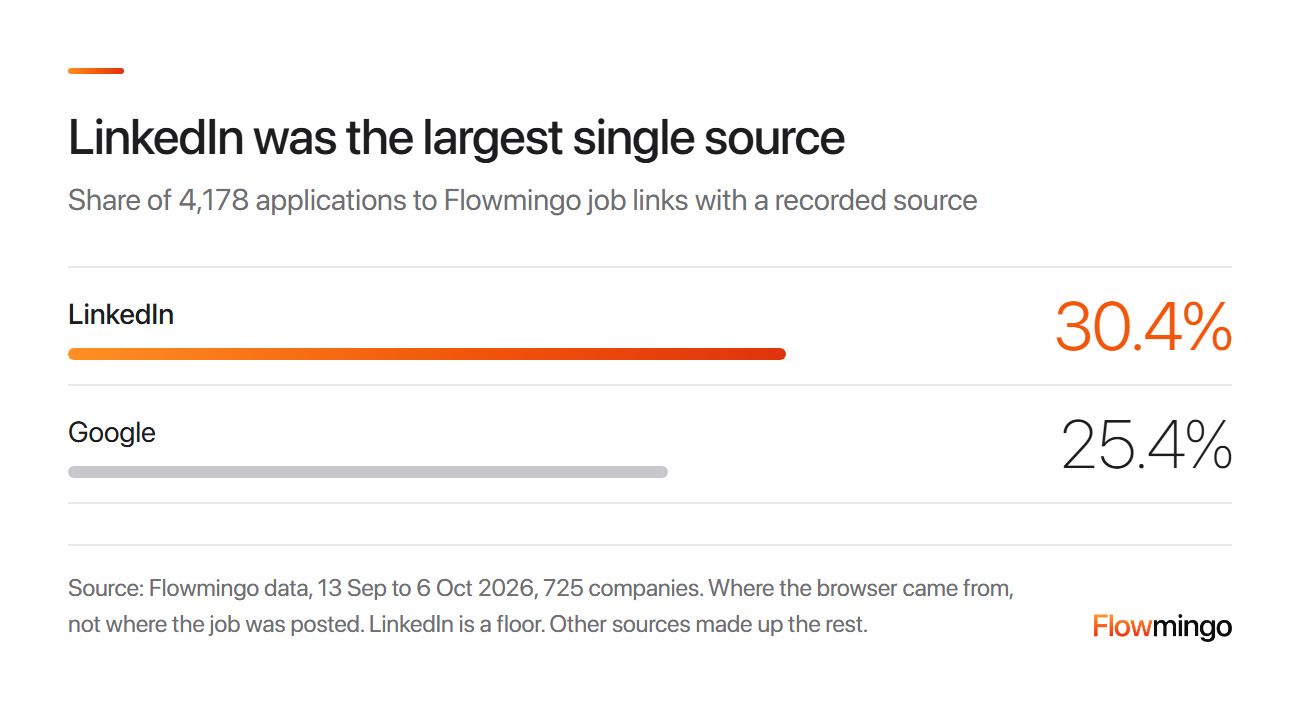
Where applications came from: of 4,178 Flowmingo job-link applications with a recorded source, 30.4% came from LinkedIn. Google sent 25.4% (13 Sep to 6 Oct 2026).
LinkedIn's bar is the longest of the named sources, just ahead of Google. It does not show that LinkedIn brings better applicants, which section 10 tests.
How Flowmingo helps
The AI Interviewer works from 1 link you send, and candidates answer in their own time, after they sign in or verify their email. Flowmingo scores every interview against your criteria, with written reasons, the recording and the full transcript. Flowmingo does not post to LinkedIn or sync with it: you post, then paste its link as the external apply link. Flowmingo also connects to 20+ ATSs, including Greenhouse, Lever and Workday, and writes the score back to the candidate. Or use its own Full ATS.
8. Why did LinkedIn pause my free job post, and must I pay to restart it?
It paused because it reached day 14 or LinkedIn's application limit, usually 10 to 30 applications. To restart it, you must pay to promote it.
LinkedIn Help is blunt: "To unpause your job, you must promote it". LinkedIn's free vs promoted page uses both words: "hidden from search results", then "paused and removed from search results".
Either way, a shared link shows it closed and nobody new finds it. That means the first 10 to 30 applicants are the whole free post, so the pay range and the 1 question decide who they are.
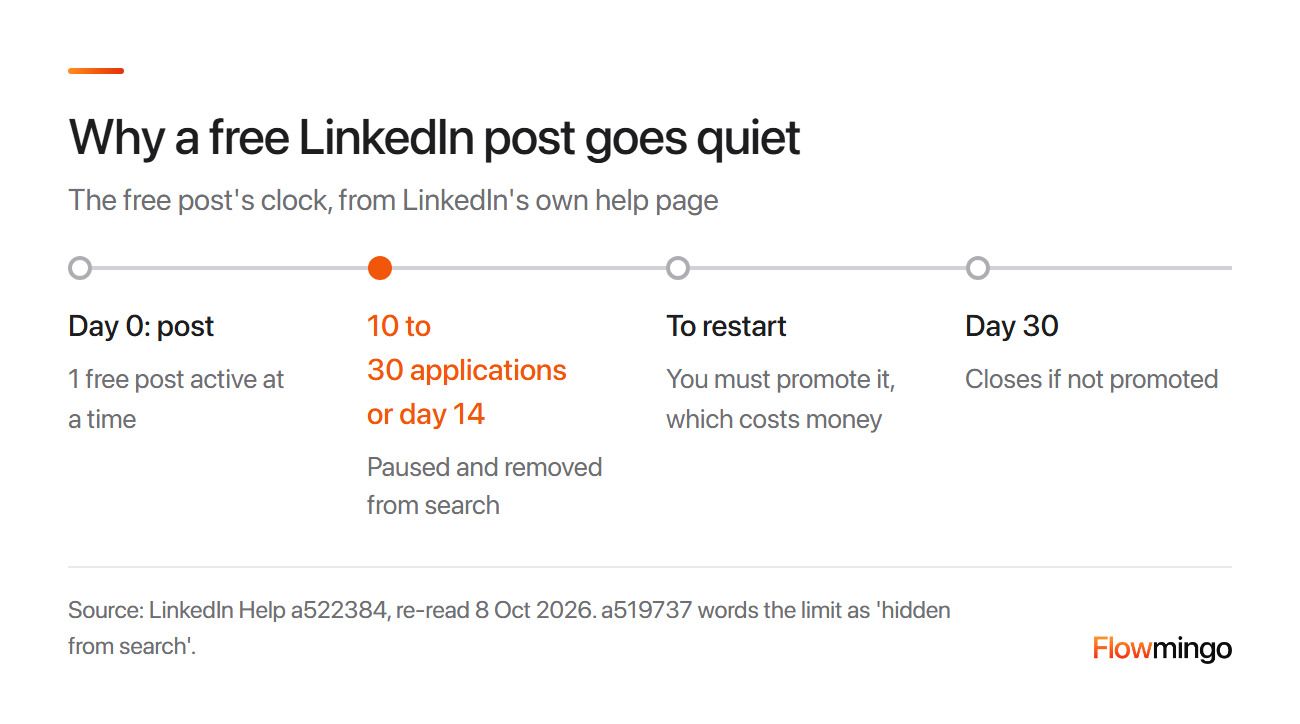
Free post clock: a free LinkedIn post pauses after 14 days or 10 to 30 applications. It closes after 30 days unless you promote it (LinkedIn Help).
The clock runs from Day 0: LinkedIn pauses it at the limit or day 14, removes it from search and closes it on day 30.
Plan the 14 days, because the clock starts at once. For example, screen on Tuesday and Thursday, then interview in week 2.
8.1 Why is LinkedIn making me pay to post when it should be free?
Search and staffing companies get 0 free posts: "No, this is not possible", says LinkedIn Help.
A foundational 2023 repost page says reposting the same title and company within 7 days requires promotion, and LinkedIn's 2026 promoted job FAQ repeats it. A foundational 2023 high-demand page adds that some high-demand roles may not be free.
A government-ID check may let you post free where you would otherwise have to promote (LinkedIn Help). For a second role, try our free job posting sites guide.
9. Free or promoted LinkedIn job: what does promoting really cost, and is it worth it?
Promotion is pay-per-view with a budget you set, and LinkedIn's pricing page example is $10 a day for 30 days, $300 or less. Set a total budget, because a promoted job cannot go back to free.
The table compares both, from free vs promoted jobs and promoted job posts:
| Free post | Promoted post | |
|---|---|---|
| Stays active | Pauses after 14 days; closes at 30 days | Until you close it, up to 6 months |
| Applicant limit | Usually 10 to 30, then paused | Unlimited |
| Screening questions | 1 free | More than 1 |
| Extras | 25 recommended candidates | Up to 350 invites, 5 InMails, 40 AI video interviews |
| Cost | $0 | Daily or total budget, pay per view |
A daily average budget bills until you close the job or for up to 6 months. A total budget spreads over about 30 days, and the promotion pauses when it runs out (budget options).
The promoted job FAQ adds that "there isn't a feature to pause a job post on demand".
An HR poster on r/humanresources reported in March 2025 that LinkedIn raised their $11 daily budget to $156 a day "based on job seeker demand". Their bill passed $500 in 3.5 days. That is 1 person's account, not LinkedIn policy, and they say a total max spend avoids it.
LinkedIn publishes no cost per applicant or per hire. Our suggestion: stay free for an easy, local role, and promote a hard role with a total budget. For example, if 1 good interview is worth $200 to you, set $200 and count interviews, not views.
10. My LinkedIn job post got 300+ applicants. How do I screen them fast?
Screen in 3 passes: the deal-breaker, then the same scored first step for everyone, then a hand read of the top slice. Do not read 300 CVs in arrival order.
A free post pauses at 10 to 30 applications, so a pile this size means you promoted it. At 30 seconds a CV, the foundational 2024 poster's 1,480 meant "over 12 hours just to get through them all".
Here is the triage checklist:
- Before posting, mark your deal-breaker questions Must-have: 1 on a free post, more once promoted.
- On Easy Apply, filter out applicants who fail your screening question on the job's Settings tab, then sort by location or relevance (LinkedIn Help). External-link applicants are already in your tool.
- Send everyone left the same short scored step: your external link or a written task.
- Score answers on 1 rubric, then read the top slice by hand, as our candidate shortlisting guide shows.
- Reply to everyone you turn down, using our rejection email templates.
Pass 2 works because everyone answers the same questions on 1 rubric. In Sackett and colleagues' foundational 2022 re-analysis, structured interviews predicted job performance more than twice as well as unstructured ones.
Flowmingo data · 6,340 job-link applicants with a CV score · 1,629 from LinkedIn at 116 companies · 27 Apr to 8 Oct 2026
- 34.2% of LinkedIn applicants scored 7 or more out of 10, against 22.8% from other sources.
- 11.4% of LinkedIn applicants scored under 4, against 24.0% from other sources.
- About 0.1 points was the median gap inside the same hiring project, across 38 projects at 20 companies.
- 22 of 38 jobs had LinkedIn applicants scoring higher, and 15 had them lower.
Medians were about 6.5 vs about 5.8 across all jobs. The CV score is an AI evaluation against each job's criteria, not job performance or a hire, and the overall gap mostly reflects which jobs get LinkedIn traffic. Sources before 13 Sep come from a backfill not yet independently checked, though data since then agrees. Other sources include email and paid ads.
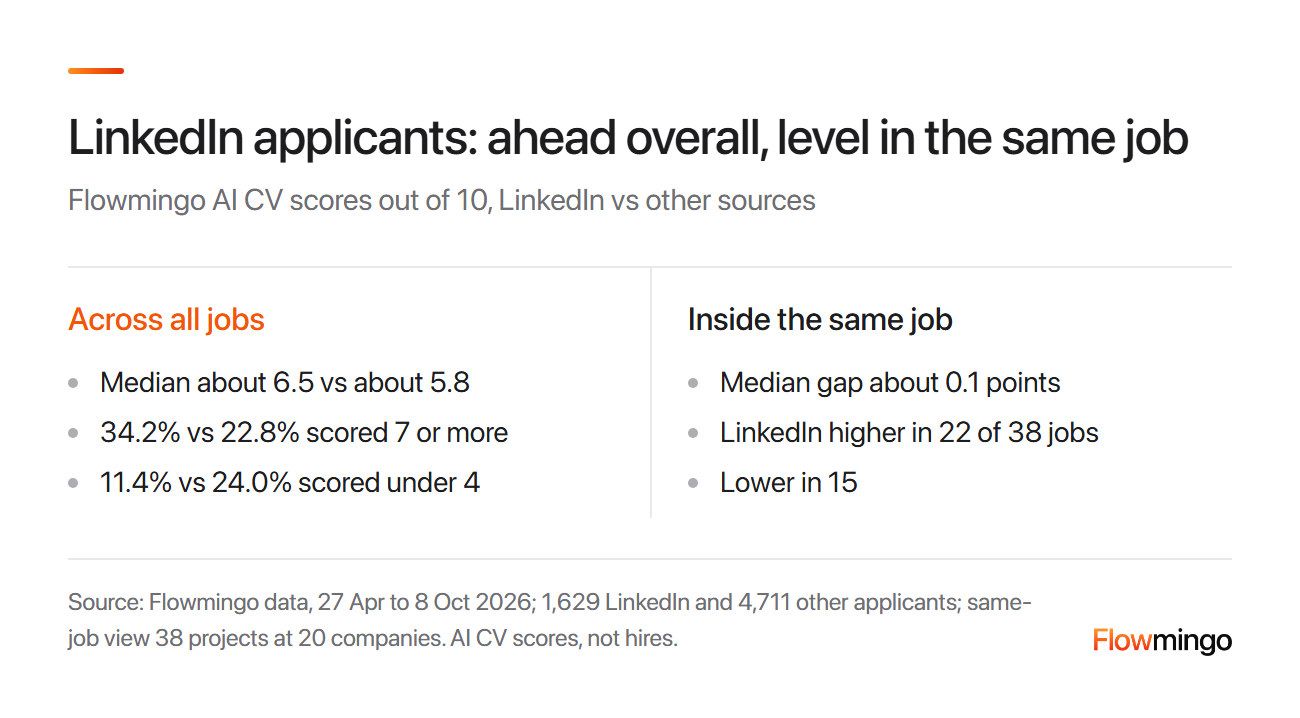
LinkedIn vs other sources: LinkedIn applicants scored higher across all jobs (34.2% vs 22.8% at 7 or more). Inside the same job, the median gap was about 0.1 points (Flowmingo data).
On the left, LinkedIn applicants look stronger. On the right, inside the same job, the groups are almost level, so the source label cannot replace the screen.
10.1 How do I close or repost the job when I'm done?
Close the job yourself the day you fill it. A free post closes on its own at day 30, but a promoted one keeps billing until you close it (LinkedIn Help).
A repost counts as a new job, and earlier applicants stay with the closed post. Bulk export is hard without Recruiter (section 6), so save your shortlisted CVs before you repost.
How Flowmingo helps
For passes 2 and 3, CV Evaluation scores every CV out of 10 against weighted criteria from your job description, with the evidence written out. The AI Interviewer asks every candidate the same core questions, adapts to each answer and follows up where it matters. It scores everyone on the same written criteria, and Flowmingo rejects nobody automatically. Try Flowmingo as the apply link when you work out how to post a job on LinkedIn.
11. Sources
Every LinkedIn rule below was read on LinkedIn's own help pages on 8 October 2026. Each page this post quotes was read again on 13 October 2026 (12 November where marked), and Flowmingo figures come from Flowmingo's own platform data.
- California Legislature. (2026). California Labor Code section 432.3. California Legislative Information.
- Colorado General Assembly. (n.d.). Colorado Revised Statutes 8-5-201: Pay rates in job listings. Colorado Revised Statutes. Retrieved October 13, 2026.
- Cornell Law School Legal Information Institute. (n.d.). 42 U.S. Code 2000e-3: Other unlawful employment practices. Retrieved October 8, 2026.
- European Parliament & Council of the European Union. (2023). Directive (EU) 2023/970 on pay transparency (foundational). Official Journal of the European Union.
- Illinois Department of Labor. (2024, December 16). Pay transparency law takes effect January 1 [Press release]. Retrieved October 13, 2026.
- LinkedIn. (n.d.). LinkedIn job posting cost overview. LinkedIn Business. Retrieved October 8, 2026.
- LinkedIn. (2026). Add screening questions to your job post. LinkedIn Help. Retrieved October 13, 2026.
- LinkedIn. (2026). Applicant options for your job post. LinkedIn Help. Retrieved October 13, 2026.
- LinkedIn. (2024). Claim Basic Jobs on LinkedIn (foundational). LinkedIn Help. Retrieved November 12, 2026.
- LinkedIn. (2026). Compensation information on a job post. LinkedIn Help. Retrieved October 13, 2026.
- LinkedIn. (2026). Control your visibility to candidates. LinkedIn Help. Retrieved October 8, 2026.
- LinkedIn. (2026). Differences between free and promoted jobs. LinkedIn Help. Retrieved November 12, 2026.
- LinkedIn. (2026). Job post budget options on LinkedIn. LinkedIn Help. Retrieved October 8, 2026.
- LinkedIn. (2025). Jobs from search and staffing companies FAQ. LinkedIn Help. Retrieved October 13, 2026.
- LinkedIn. (2026). Manage your posted jobs. LinkedIn Help. Retrieved October 13, 2026.
- LinkedIn. (2026). Manage your promoted job post FAQ. LinkedIn Help. Retrieved October 13, 2026.
- LinkedIn. (2026). Post a free job on LinkedIn. LinkedIn Help. Retrieved October 13, 2026.
- LinkedIn. (2026). Post a job from your company's account. LinkedIn Help. Retrieved October 13, 2026.
- LinkedIn. (2026). Post a job on LinkedIn. LinkedIn Help. Retrieved October 13, 2026.
- LinkedIn. (2026). Promoted job posts. LinkedIn Help. Retrieved October 8, 2026.
- LinkedIn. (2026). Renewability and duration of a job posting. LinkedIn Help. Retrieved October 13, 2026.
- LinkedIn. (2026). Verification badge on job posts. LinkedIn Help. Retrieved October 8, 2026.
- LinkedIn. (2026). Verify your identity to post a job. LinkedIn Help. Retrieved October 13, 2026.
- LinkedIn. (2024). Generic company pages FAQ (foundational). LinkedIn Help. Retrieved October 8, 2026.
- LinkedIn. (2026). Create and share a job post via #Hiring on LinkedIn. LinkedIn Help. Retrieved November 12, 2026.
- LinkedIn. (2023). Free job reposting limitations (foundational). LinkedIn Help. Retrieved October 8, 2026.
- LinkedIn. (2023). Limits on high-demand jobs (foundational). LinkedIn Help. Retrieved October 8, 2026.
- LinkedIn Developer Documentation. (2026, June 3). Job Posting API overview. Microsoft Learn.
- Ministry of Manpower Singapore. (n.d.). Employment Pass: Consider all candidates fairly. Retrieved October 13, 2026.
- Ministry of Manpower Singapore. (n.d.). Fair Consideration Framework. Retrieved October 8, 2026.
- New York City Commission on Human Rights. (n.d.). Salary transparency in job advertisements. Retrieved October 8, 2026.
- New York State Department of Labor. (n.d.). Pay transparency. Retrieved October 8, 2026.
- Padova, N. (2023, February 13). This is why you should include salary ranges in your job posts (foundational). LinkedIn Talent Blog.
- r/humanresources. (2024, August 15). Overwhelmed by 1480 applications on my first LinkedIn job posting (foundational) [Online forum post]. Reddit.
- r/humanresources. (2025, March 6). Warning for anyone who uses LinkedIn to post/promote jobs [Online forum post]. Reddit.
- r/humanresources. (2025, October 15). LinkedIn job posting, Canada [Online forum post]. Reddit.
- r/recruiting. (2025, July 30). How to post a job on LinkedIn from a company page without notifying my network [Online forum post]. Reddit.
- Sackett, P. R., Zhang, C., Berry, C. M., & Lievens, F. (2022). Revisiting meta-analytic estimates of validity in personnel selection (foundational). Journal of Applied Psychology, 107(11), 2040-2068.
- Smart, G., & Street, R. (2008). Who: The A method for hiring (foundational). Ballantine Books. Quoted in Eliason, N. (n.d.). Who by Geoff Smart: notes. Retrieved November 12, 2026.
- Tripartite Alliance for Fair and Progressive Employment Practices. (n.d.). Writing job advertisements. Retrieved October 8, 2026.
- Washington State Department of Labor and Industries. (2025, December 3). Administrative Policy ES.E.2: Pay transparency requirements. L&I. Retrieved October 13, 2026.