
You have been told to put HR on AI this quarter, so you need AI tools for HR that save real hours. Those hours have to come out of the work you already carry: hiring, onboarding, payroll questions and 1 review cycle.
Search Google for AI tools for HR, and 7 of the 10 results on its first page are lists of the best AI tools for HR professionals. All 7 include the publisher's own product, and 5 of them put it first.
They are also quiet about price. Juicebox, which sells a candidate-search tool and ranks itself first, prices none of the 12 tools on its list, and no list adds up a year's cost for a company of a stated size.
Meanwhile, your managers may already be ahead of your policy. In a 2026 survey of 399 managers by The Predictive Index, 44% said they had entered employee names and performance details into public AI tools, as HR Dive reported.
That is why the policy has to come before the tool: by the time you choose one, staff details may already be sitting in public AI tools. Section 8 gives a 1-page starting point.
Which tool you buy matters less than which job you point it at. Find the HR task that eats the most hours, and check whether the assistant you already pay for can do it before you add anything.
This list sorts 12 tools by the HR job each one does, with a dated price and 1 real limit from the vendor's own page. We make Flowmingo, 1 of the 12, and it sits at entry 5 only because the list follows a fixed order by HR job rather than a ranking.
Key takeaways
- Which AI tools for HR should a small team try first? The assistant in your suite, since Copilot Chat costs nothing extra on eligible Microsoft 365 plans. License only the 3 to 5 people who draft daily.
- What do AI tools for HR cost a 100-employee company a year? From $0 extra to $25,200 at list prices, so price only the seats that do the work.
- Is it safe to paste employee data into ChatGPT? Not into a personal account, which OpenAI may train on unless you opt out. The business plans of OpenAI, Microsoft, Google and Anthropic say they skip training by default.
- Can an AI tool screen applicants for us? It can score CVs and run first interviews, but a person should decide. In New York City, a score that outweighs other factors can require an audit for bias and 10 business days' notice.
- What should HR do before rolling out an AI tool? Write a 1-page AI policy before anyone pastes staff data, then test 1 tool on 1 task for 2 weeks beside your own work.
1. Leadership says use AI: which AI tools for HR will save us hours this quarter?
Start with the assistant in your suite, then add 1 of these AI tools for HR where the most hours go.
In SHRM's 2026 report on AI in HR, drawn from 1,908 HR professionals, just 39% of organisations were currently using AI in their HR functions, so a team starting now is not behind most employers. Talent acquisition led, with 27% of organisations using AI there.
To make this list, each tool had to pass 5 tests:
- It does 1 HR job that eats hours at a 20 to 500 person company.
- It prints its price, or says that it quotes only.
- It states in writing how it handles your data.
- It leaves every hiring, pay or review decision about a person to a person.
- Its own page shows 1 real limit, printed below.
Every price and limit below is the vendor's own, as its site showed it on 11 and 12 November 2026, in US dollars before tax. Gusto's is the exception: it comes from the archived copy of its page from 3 November.
The order is a rule, not a ranking. The 4 drafting assistants come first, because the advice is to start with the one in your suite, and the HR jobs follow in the order a new hire meets them, from hiring to payroll.
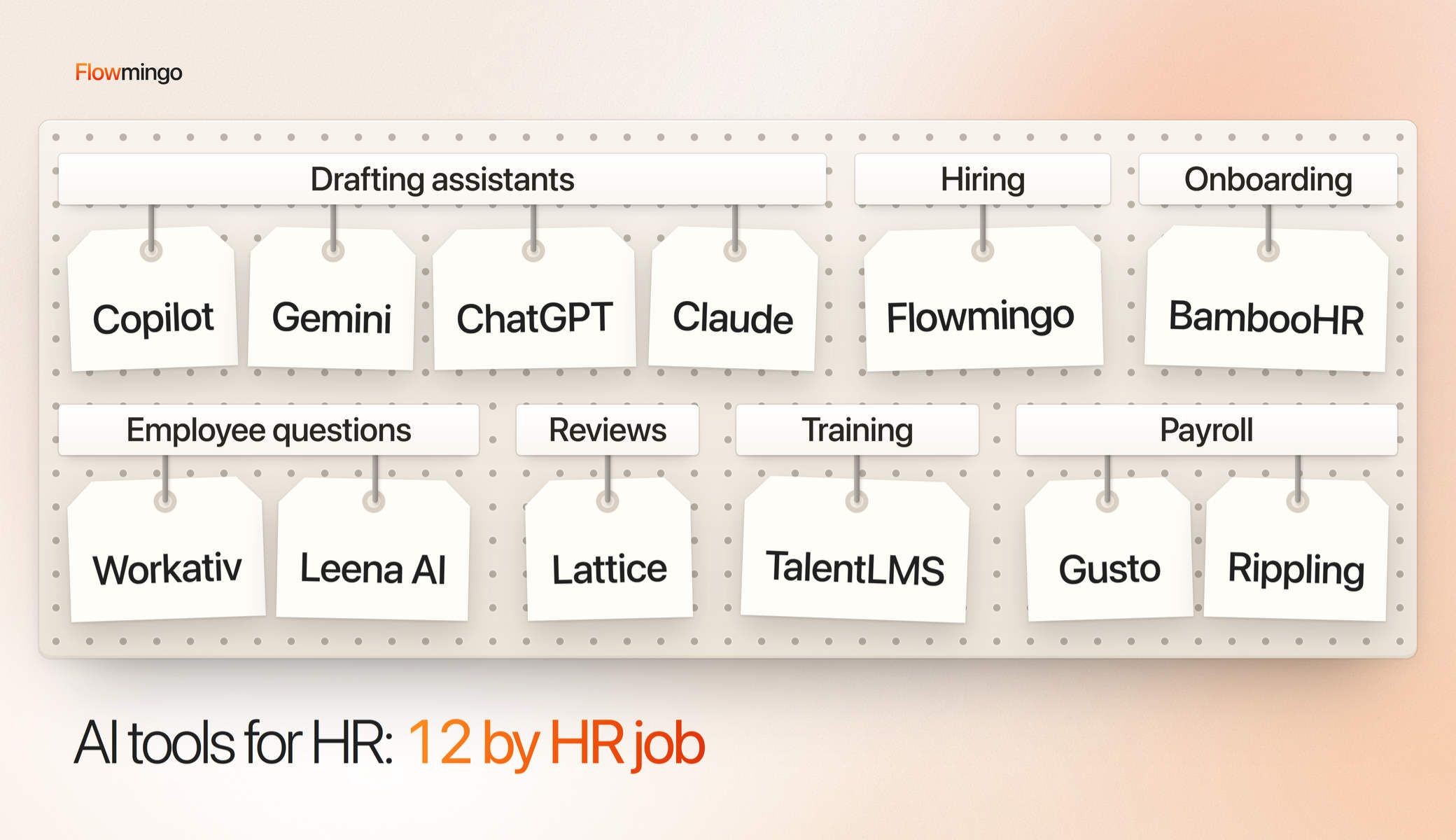
Within each HR job, a tool with a full public price comes before one without. Grouped that way, this HR AI tools list covers 7 HR jobs, and the figure below shows which entries fall under each.
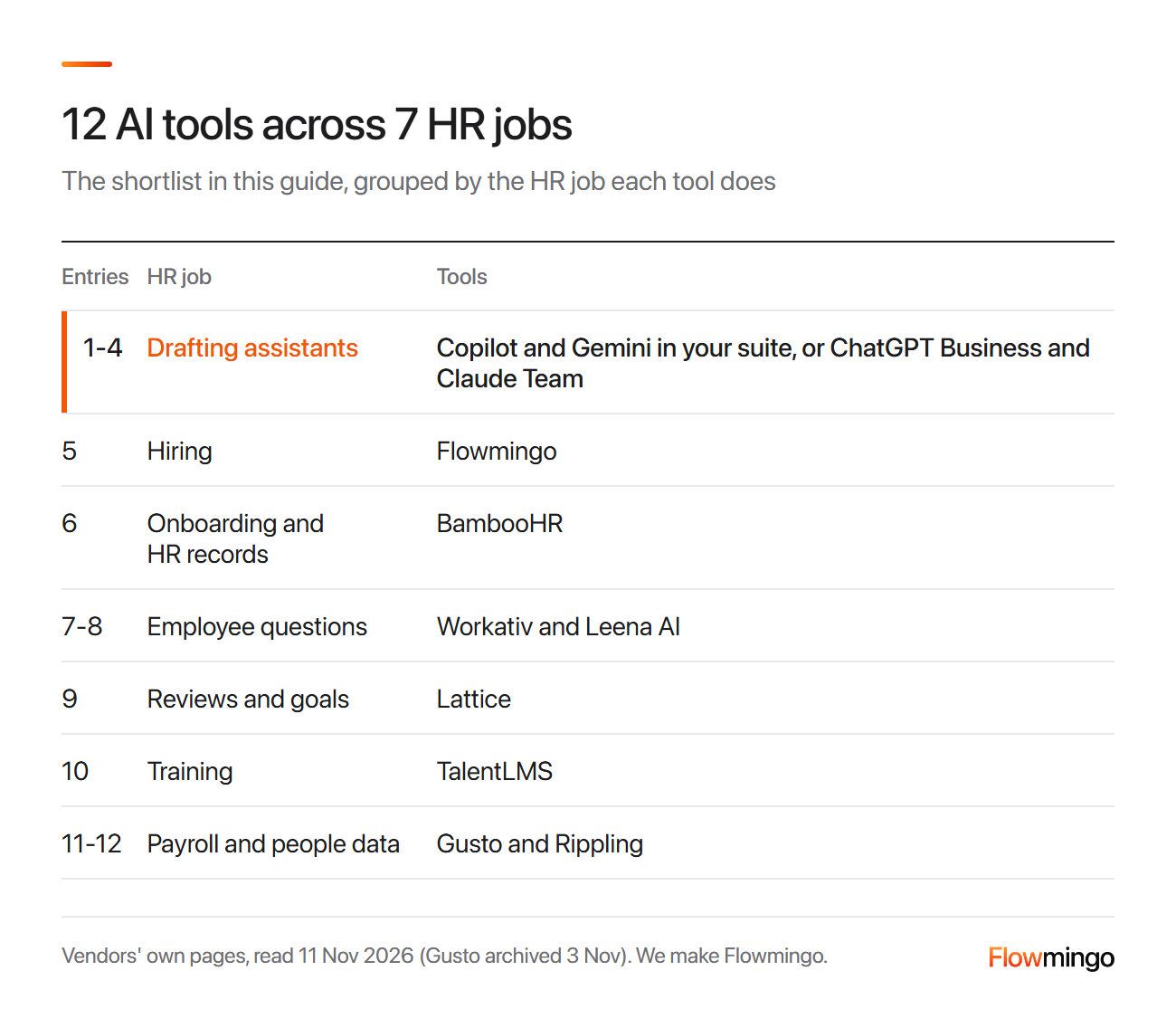
HR jobs shortlist: 12 tools across 7 HR jobs, numbered as in the list. Start with the assistant already in your suite, then add 1 tool for the job that takes the most hours.
Drafting assistants. Of these 4, Copilot and Gemini may already sit on your invoice, because Copilot Chat comes with eligible Microsoft 365 plans and Gemini with Google Workspace Business Standard.
1. Microsoft 365 Copilot
Best for: companies already drafting in Microsoft 365.
- What it does: Copilot Chat answers from the web, and the paid Copilot licence adds the assistant inside Teams, Word, Excel and PowerPoint, where it works on your own files.
- Price: Copilot Chat costs $0 on eligible plans, and the licence costs $21 a user a month, paid yearly.
- Real limit: Microsoft includes the everyday AI features in the licence, but bills the more advanced ones by usage, on top of the licence price.
2. Gemini in Google Workspace
Best for: Workspace companies on Business Standard or above.
- What it does: brings Gemini into Gmail, Docs, Sheets, Drive and Meet, under Workspace's business data terms.
- Price: included in Business Standard, at $14 a user a month on a yearly commitment.
- Real limit: the cheaper Business Starter plan, at $7, has Gemini only in Gmail and the Gemini app, not in Docs or Sheets.
3. ChatGPT Business
Best for: teams moving ChatGPT drafting to a company account.
- What it does: a shared workspace with GPTs that, by default, does not train on your data.
- Price: $20 a user a month for a Standard seat, billed yearly.
- Real limit: Standard seats carry what OpenAI calls a 5-hour usage limit. Only Premium seats drop that limit, and they cost $100 a user a month billed yearly.
4. Claude Team
Best for: HR teams of 2 or more writing long documents.
- What it does: a team workspace with admin controls that, by default, does no model training on your content.
- Price: $20 a seat a month billed yearly, for teams of 2 to 150.
- Real limit: usage limits reset every 5 hours, and weekly limits sit on top.
Hiring. This list carries only 1 hiring tool, because our guides to AI CV screening software and AI interview tools for recruiters compare many more, as do our AI recruiting tools list and our comparison pages.
5. Flowmingo
Best for: teams that want free AI interviews and CV scoring.
- What it does: scores every CV against criteria you weight. You then send 1 link for a spoken AI interview that each applicant does in their own time, and get back the recording and a 0 to 10 score per criterion.
- Price: the Free plan costs $0 with no end date, and the Starter plan costs $42 a month, paid yearly.
- Real limit: Free keeps your latest 300 videos for 30 days, allows 3 PDF or DOCX report downloads in total and caps interviews at 20 minutes.
Onboarding and HR records. BambooHR keeps both in 1 system, with an AI assistant included.
6. BambooHR
Best for: 25 to 500 person companies wanting HR records with an assistant.
- What it does: new-hire packets, onboarding checklists and an AI Assistant that answers everyday questions, such as time off, from your company data.
- Price: the Core plan costs $10.25 and Pro $17.50 an employee a month, for companies above 25 staff.
- Real limit: answers from your policies and handbook need Pro, and the payroll add-ons cover US employees only.
Employee questions. Workativ and Leena AI, the next 2 entries, answer staff in Slack, Teams or your HR systems.
7. Workativ
Best for: Slack or Teams companies with repeated policy questions.
- What it does: an AI agent trained on your documents answers staff, with no per-user fees.
- Price: the Business plan costs $349 a month for 500 AI chat sessions, a session being 1 conversation between the agent and a member of staff.
- Real limit: after 500 sessions, the agent stops replying until the next billing period.
8. Leena AI
Best for: larger HR teams already on Workday, ServiceNow or SAP.
- What it does: handles staff requests such as time off or a password reset, with 200+ connectors to other systems.
- Price: quote only, a flat licence per employee per year, with the price sent within 1 business day.
- Real limit: by Leena's own figure, customers take 45 days on average to go live.
Reviews and goals. Lattice covers this job, and the rules in section 6 should be in place before managers use it.
9. Lattice
Best for: 100 to 500 person companies with a formal review cycle.
- What it does: reviews and 1:1s, with an AI agent that coaches managers using your own data.
- Price: the Performance product costs $10 a seat a month and Goals adds $8, or the Foundations package includes both for $13.
- Real limit: the minimum agreement is $4,000 a year, and Lattice bills yearly only.
Training. TalentLMS suits the HR generalist who also owns training.
10. TalentLMS
Best for: teams with no learning and development (L&D) staff that need to ship short courses.
- What it does: builds courses and tests with AI, translates them and adds an AI coach.
- Price: free for 5 users and 10 courses, then the Core plan at $2,628 a year for 71 to 100 users.
- Real limit: Core's AI course creator comes with 5,000 AI credits once, not every month.
Payroll and people data. Gusto and Rippling both put an assistant next to your pay data.
11. Gusto
Best for: US companies wanting payroll and an HR assistant together.
- What it does: runs payroll, and its assistant, Gus, answers payroll questions and asks before it changes anything, according to its 2024 launch post.
- Price, archived 3 Nov 2026: the Simple plan costs $49 a month plus $6 a person.
- Real limit: Simple runs payroll in 1 state only, so multi-state payroll needs the Plus plan.
12. Rippling
Best for: companies that want HR, payroll and IT in 1 system.
- What it does: lets you ask Rippling AI questions across all your Rippling data.
- Price: from $8 an employee a month, plus a monthly base fee.
- Real limit: Rippling does not publish the base fee, so a year's price needs a sales call.
2. What will AI tools for HR cost a 100-employee company a year, and what comes free?
Between $0 extra and $25,200 a year at list prices, and your suite may already include an assistant. Price only the seats that do the work, because 100 seats of the same tool cost 20 times what 5 do.
Beyond your suite's assistant, free AI tools for HR are rare. The free plans of TalentLMS (entry 10) and Flowmingo (entry 5) each carry a catch: TalentLMS stops at 5 users and 10 courses, and Flowmingo keeps only your latest 300 videos, for 30 days.
The 12 tools charge in 5 ways, and 10 of them publish a full price:
- Per seat (4): Copilot, ChatGPT Business, Claude Team and Lattice.
- Per employee (2): BambooHR, and Gusto, which adds a monthly base fee.
- Nothing extra (2): Gemini in Business Standard, and Flowmingo's Free plan.
- A flat or active-user fee (2): Workativ, at a flat monthly fee, and TalentLMS, by the number of active users.
- By quote (2): Leena AI, which publishes no price, and Rippling, which charges per employee but does not publish its base fee.
This table prices 1 illustrative company of 100 staff, at list prices before tax and volume discounts.
Drafting assistants get 5 seats unless marked. BambooHR, Gusto and Rippling charge for each of the 100 employees, and we price Lattice at 100 seats, 1 for each person in the review cycle.
| Tool and plan | Arithmetic | Per year |
|---|---|---|
| Gemini in Business Standard | Included in the plan | $0 extra |
| Flowmingo Free | No end date | $0 |
| ChatGPT Business, 5 seats | 5 x $20 x 12 | $1,200 |
| Claude Team, 5 seats | 5 x $20 x 12 | $1,200 |
| Copilot Business, 5 seats | 5 x $21 x 12 | $1,260 |
| TalentLMS Core | 71 to 100 users | $2,628 |
| Workativ Business | 12 x $349, billed monthly | $4,188 |
| Gusto Simple | 12 x $49 + 100 x $6 x 12 | $7,788 |
| Rippling | 100 x $8 x 12 + base | From $9,600 |
| Lattice Performance, 100 seats | 100 x $10 x 12 | $12,000 |
| BambooHR Pro | 100 x $17.50 x 12 | $21,000 |
| Copilot Business, all 100 | 100 x $21 x 12 | $25,200 |
| Leena AI | Not published | Ask |
The figure below highlights Copilot at 5 seats, $1,260 a year, against Copilot on all 100, which is the same tool at 20 times the price.
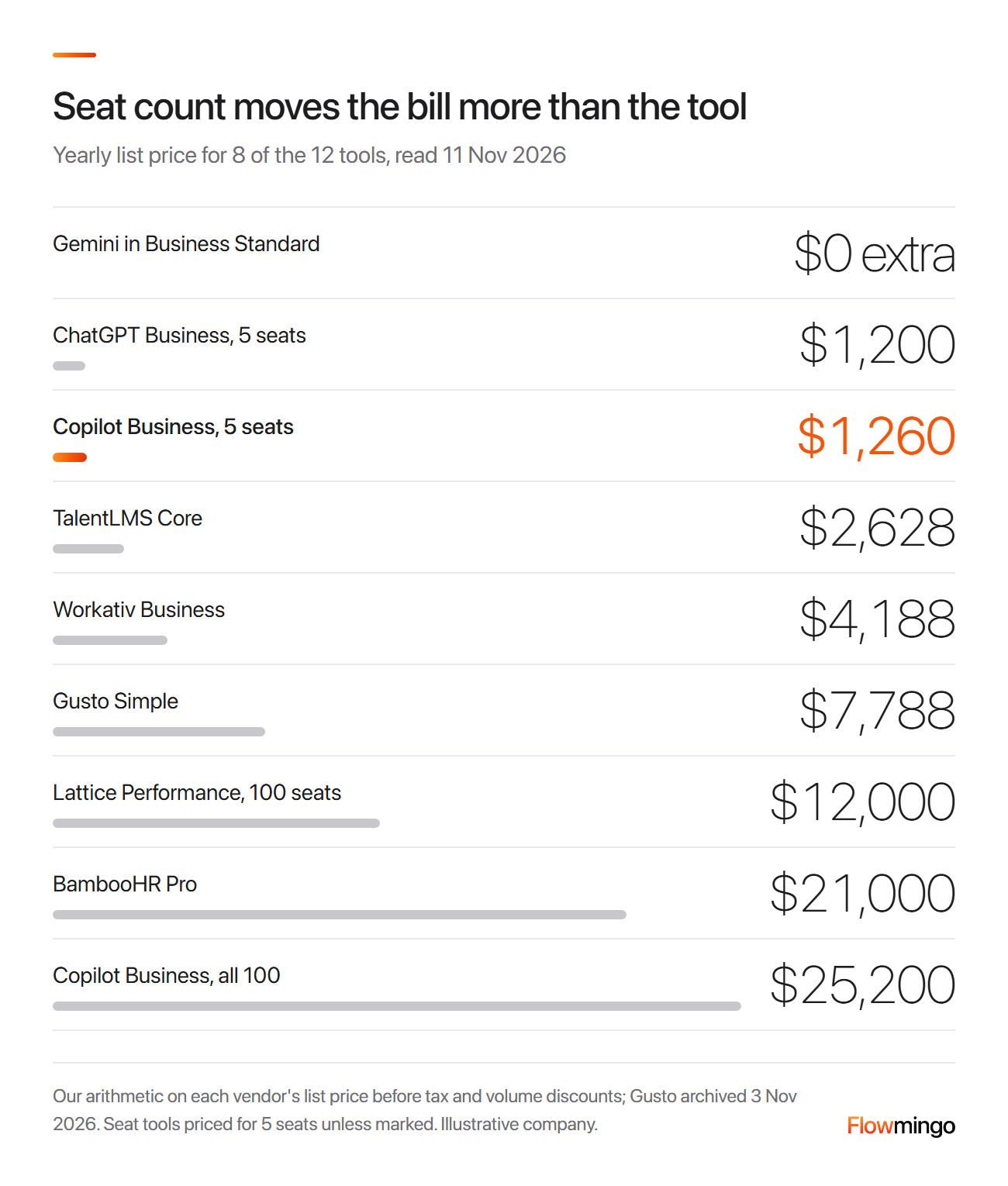
Cost for 100 staff: yearly list prices run from $0 extra for Gemini in Business Standard up to Copilot on every seat.
Those 5 Copilot seats cost even less in year 1 for existing Microsoft 365 Business customers who order by 31 December 2026. They pay $1,080, because Microsoft is selling the licence at $18 a user a month, for the first year only.
For example, a starter budget of the included assistant, 5 ChatGPT Business seats, Workativ, TalentLMS Core and Flowmingo Free costs $8,016 a year, and it covers drafting, staff questions, training and hiring.
Workativ's page says yearly billing saves 15% but shows no yearly price, and it mentions a free plan called Magic without saying what it includes. So for Workativ on yearly billing, and for Leena AI and Rippling, get the rate, the renewal cap and the minimum term in writing.
3. Can we paste employee data into ChatGPT or Copilot, and what should we check first?
Not into a personal account, because OpenAI may train on chats in ChatGPT's Free, Plus and Pro plans unless you opt out. The business plans of OpenAI, Microsoft, Google and Anthropic say they do not train on your content by default.
Anthropic's personal plans, Claude Free, Pro, Max and Ultra, also list model training as opt-out, as the figure below shows.
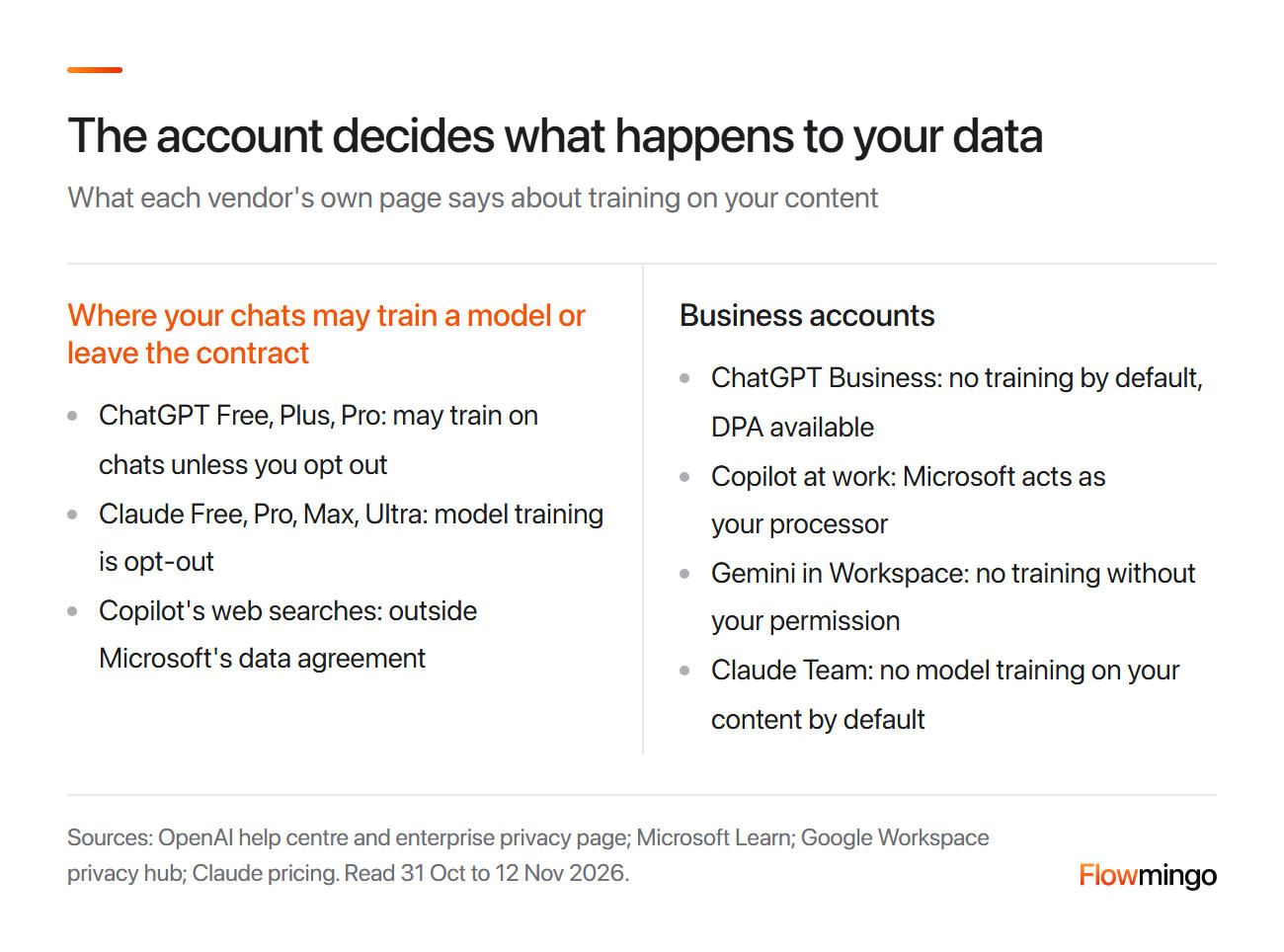
Personal vs business accounts: personal ChatGPT and Claude plans may train on chats unless you opt out. Business plans of all 4 vendors say they do not by default.
The business plans differ in how they put that promise in writing. ChatGPT Business adds a DPA, short for data processing addendum, the contract that sets how a vendor may handle your data.
With Copilot at work, Microsoft acts as your processor, which means it handles the data on your behalf under its data agreement. Google says Gemini in Workspace does no training without your permission.
The gap is Copilot's web searches. When Copilot sends a query to Bing, Microsoft acts for itself rather than as your processor, so those searches sit outside Microsoft's data agreement (Microsoft Learn).
Before any employee data goes in, put these 5 checks to the vendor:
- Training: read the plan's own page, because personal plans may train on chats.
- Storage: ask which features follow your data settings, since Google says your data-region settings do not apply in Gemini Notebook, formerly called NotebookLM.
- Processor agreement: ask for a DPA that binds the vendor to your documented instructions, as GDPR Article 28, in the EU's 2016 data protection law, requires.
- Risk assessment: run a data protection impact assessment before high-risk use, as GDPR Article 35 requires.
- Monitoring: use no AI that reads emotions from faces or voices at work in the EU, except for medical or safety reasons. The EU AI Act, a 2024 law, has banned it since 2 February 2025.
ChatGPT for HR is a drafting tool, for rejection and offer letters, policies and training outlines, and what it drafts still needs a person to check it.
The reason comes from a 2023 experiment with 758 consultants at BCG (Dell'Acqua and colleagues). On tasks inside AI's abilities, those using GPT-4 finished 12.2% more tasks and worked 25.1% faster.
On a task chosen to be beyond AI's abilities, consultants using GPT-4 were 19 percentage points less likely to be right than those working without it. So check every law, number and date before anything leaves HR, and ask for an Excel formula rather than uploading payroll data.
4. Which AI tool can screen applicants and run first interviews without a new ATS?
Pick a tool that scores every applicant against the same written criteria and shows the evidence behind each score. It should connect to the applicant tracking system (ATS) you already use and leave the decision to a person.
Pasting CVs into a general chatbot is the risky shortcut. In a 2024 study by Wilson and Caliskan, AI language models favoured White-associated names in 85.1% of tests, across more than 3 million CV-to-job comparisons.
By contrast, a tool that asks every applicant the same questions and scores them against one guide follows the method with the best record. Structured interviews, built that way, ranked first among hiring methods in a 2022 review by Sackett and colleagues.
Tell candidates upfront, because most are never told. Greenhouse's 2026 survey, run by a company that sells an ATS, covered 2,950 job seekers in 5 countries and reports its figures for the 1,200 in the US.
Of those 1,200 US job seekers, 38% had quit a hiring process over an AI interview, and 70% were never clearly told upfront that AI would evaluate them. Applicants also choose when to finish an AI interview, and in our data they often finish outside office hours.
Flowmingo data · 38,014 completed AI interviews at 776 companies, 13 Aug to 10 Nov 2026
- 45% finished outside 9 am to 6 pm in the candidate's device time zone.
- 33% finished between 6 pm and midnight, after most offices close.
- 8% finished between midnight and 6 am, and 4% between 6 am and 9 am.
- 18% finished on a Saturday or a Sunday, outside the working week.
Time zone is the candidate's device setting, not a verified location. India (37%) and Nigeria (17%) dominate, and without them the share is unchanged. It shows when candidates chose to finish, not hours saved.
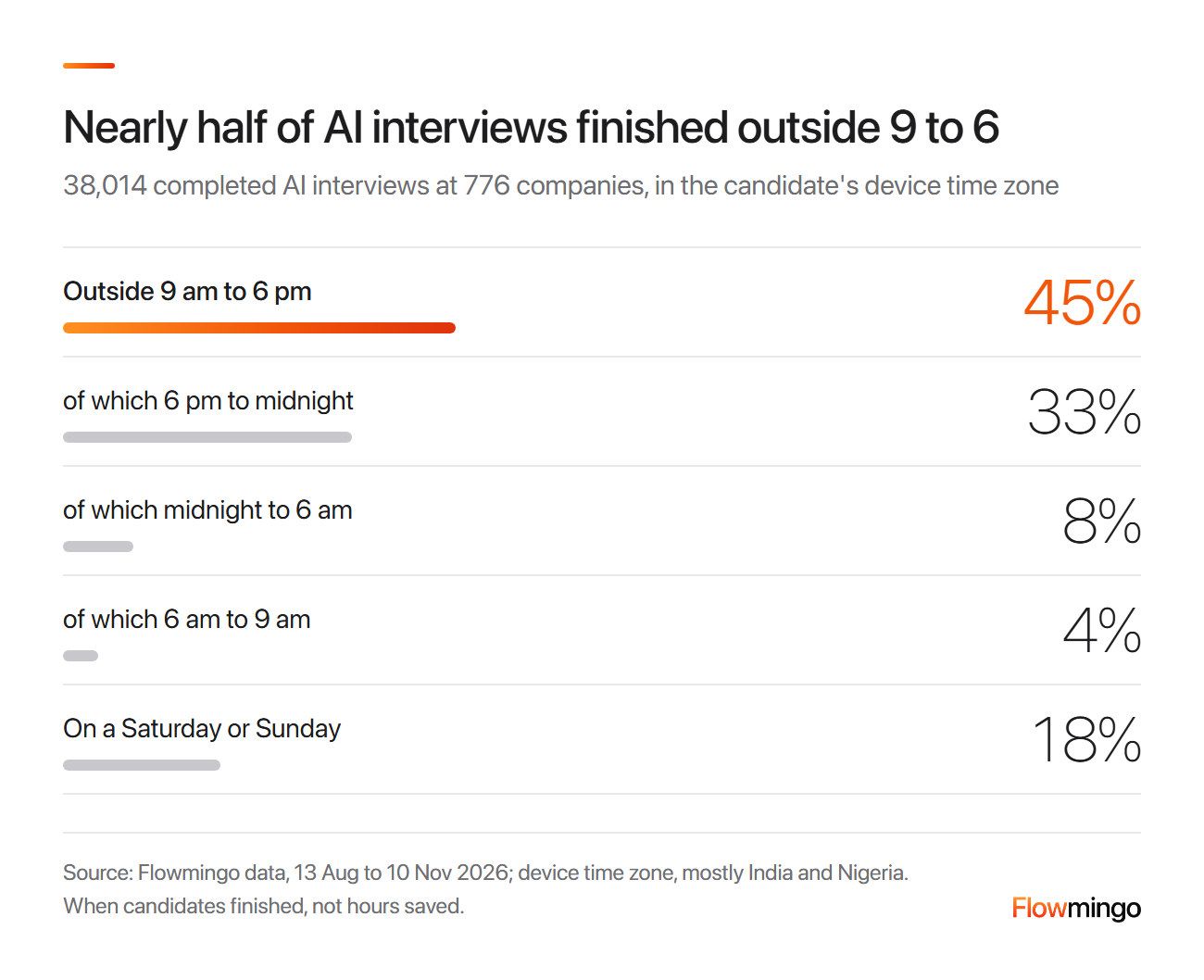
When AI interviews finish: of 38,014 interviews from 13 August to 10 November 2026, 45% finished outside 9 am to 6 pm.
Before you trust any AI interview score, run a bad-answer test, because a tool can score words it does not understand. The journalist Hilke Schellmann showed this in her 2024 book, The Algorithm.
She answered an AI video interview by reading out the German Wikipedia entry on psychometrics, and still scored a 73% match, as a review of the book recounts.
So give the tool 1 off-topic answer and 1 in the wrong language. The score must drop or show a flag, and if it does neither, it is not measuring the answers.
How Flowmingo helps
Keep your current ATS. Connect it once with the setup guides for 23 ATSs (listed 11 Nov 2026), and a stage rule sends the AI interview at the stage you choose.
Where your ATS allows it, Flowmingo writes back an overall score out of 100, with a report link to each criterion's 0 to 10 score. Nobody is rejected automatically.
5. Can AI answer employees' leave, benefits and policy questions so HR stops answering the same emails?
Yes, if it answers only from your own documents and hands anything personal to a person.
The closest evidence comes from customer support rather than HR. In a study of 5,172 customer-support agents, an AI assistant lifted the issues resolved per hour by 15% on average, and by 30% for less skilled and less experienced agents.
The AI suggested replies to the human agents rather than answering customers itself (Brynjolfsson, Li and Raymond). In HR terms, the gain goes to the HR person answering, which suggests a newer HR coordinator may gain most.
The study never tested a bot that answers staff on its own, as Workativ and Leena AI do, so test any bot on your own questions before you trust it. You have 3 routes:
- Your suite: load only the handbook, never staff files, into a Copilot agent or a Gemini notebook. One HR team on Reddit loaded its playbooks into Google's NotebookLM (r/humanresources).
- Your HR system: BambooHR Pro (entry 6) answers policy, handbook and benefits questions.
- A help desk: Workativ (entry 7), or Leena AI (entry 8) by quote.
The risk is a wrong answer sent as fact. One Reddit commenter said their HR person pasted ChatGPT replies to staff unedited, and that some were not accurate (r/humanresources).
So the bot must name the handbook section behind each answer, and questions about pay, health and complaints go to a person. For example, take 20 real questions from last month's inbox before you buy, ask each tool, and count right, wrong and handed to a person.
6. Can our managers use AI to write performance reviews, and what should HR allow?
Allow AI to tidy and structure what a manager observed, never to rate people or decide pay. The Predictive Index's 2026 survey also asked 208 CEOs and business leaders, and only 45% of the organisations surveyed said they had a formal written policy on AI in performance management.
The same survey found managers already pasting staff details into public AI tools (HR Dive), which means the habit has arrived before the rule. So write your policy before the next review cycle opens, with 4 rules:
- Business accounts only, as section 3 explains.
- The manager writes 3 dated examples first, and AI only edits the wording.
- No AI ratings, rankings or pay suggestions.
- HR checks each draft against its examples for anything invented.
For example, a manager should not paste "John missed 3 deadlines in Q3" into a personal chatbot. Instead, they write the 3 dated examples with initials in the business workspace, and AI turns them into a paragraph the manager signs.
The law reaches reviews too. Illinois has barred AI with a discriminatory effect in promotion and discipline since 1 January 2026. The EU bans AI that reads staff emotions from face or voice, so skip any tone or "sentiment" scoring of staff calls.
7. Which AI laws can reach our hiring or reviews in NYC, Illinois, Colorado or the EU?
Several can, reaching reviews, promotions and firing as well as hiring, depending on where the person is. This is general information, not legal advice.
In SHRM's 2026 report, 57% of HR professionals in the 19 US states with AI workplace laws did not know about them (SHRM), so read the rules below even if no one has raised them.
In short, the duties in New York City and Illinois already apply, and Illinois's 2026 law reaches promotion and discipline as well as hiring. Colorado, the EU and Singapore follow from 2027, so start with the places where your candidates and staff are.
New York City. Local Law 144, the city's law on automated employment decision tools, can apply when you rely only on a tool's score, weight it above other factors, or let it overrule people. When it does, you need an audit for bias within the past year.
You also publish a summary of its results, and candidates and employees who live in the city get 10 business days' notice. The city's Department of Consumer and Worker Protection set out those duties, and the 3 tests above, in a rule adopted in 2023.
Illinois. The state has 2 laws to know. The older one, the AI Video Interview Act, has applied since 2020 to AI-analysed video interviews for jobs based in Illinois.
Before the interview, the employer must give notice, explain how the AI works and get consent, and it must delete the video within 30 days of a request (Illinois General Assembly).
The newer law, in force since 1 January 2026, bars AI with a discriminatory effect in hiring, promotion or discipline. Staff also get notice when an employer uses AI for those decisions (Crowell & Moring).
Colorado. Its law on automated decision-making, SB 26-189, covers employment decisions that an AI tool materially influences (Colorado General Assembly). Section 5 of the signed act applies it to decisions made from 1 January 2027.
From that date, you give notice before using the tool, and within 30 days of an adverse decision you explain, in plain language, the decision and the role the tool played. The person can also ask for human review, where commercially reasonable.
EU and Singapore. In the EU, the AI Act's duties for high-risk AI, a class that includes AI for hiring, promotion and performance monitoring, apply from 2 December 2027.
That date comes from Regulation 2026/1744, an amendment to the AI Act adopted in July 2026, which moved these duties back from 2 August 2026.
Singapore's Workplace Fairness Act, in force by the end of 2027, covers screening, interview invitations and appraisals, according to TAFEP, the country's fair employment body. It sets no AI-specific rule, so the Act judges an AI-assisted decision like any other.
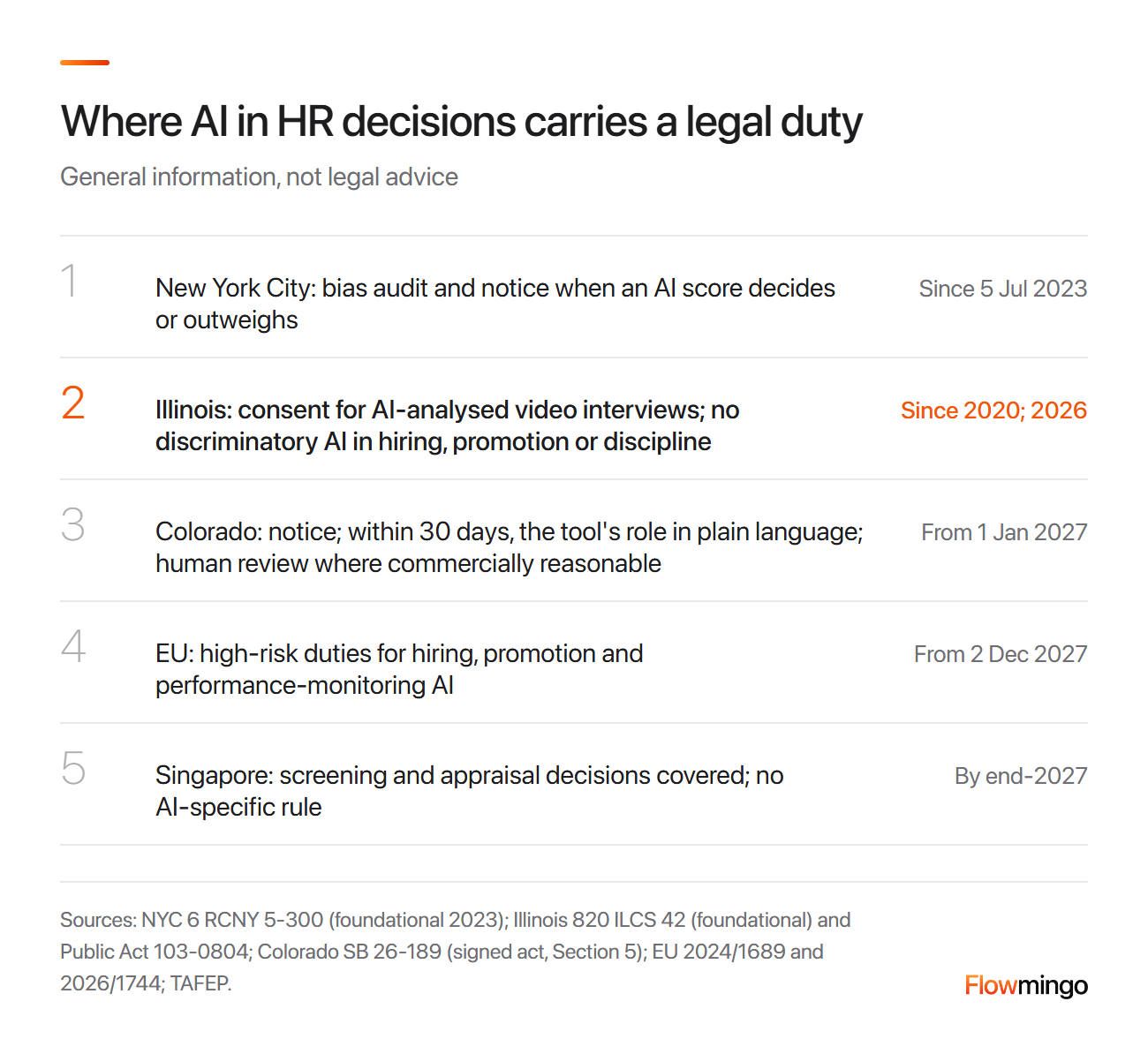
Where AI in HR carries a legal duty: NYC since 5 July 2023, and Illinois since 2020 for video interviews. Illinois covers hiring, promotion and discipline from 1 January 2026, then Colorado, the EU and Singapore follow from 2027.
In Mobley v Workday, an applicant, Derek Mobley, sued the HR software company Workday. He claims that its AI system for recommending applicants discriminated against him by race, age and disability.
In May 2025 a US court preliminarily certified his age claim as a collective action (court order). In other words, Mobley may now tell similar applicants about the case and invite them to join.
Those are applicants aged 40 and over who applied through Workday's platform since September 2020 and were not recommended. Workday may still ask the court to undo the certification, and no court has yet ruled on whether the claim succeeds.
So keep a person making and recording each decision.
8. Before rolling out AI tools for HR, what should we test and put in a policy?
Write a 1-page policy before anyone pastes staff data, then test 1 tool on 1 real task for 2 weeks. Just under half of organisations have a formal AI policy, by SHRM's 2026 count.
The policy comes early because tools arrive before rules. One HR author on Reddit found a program manager paying for ChatGPT, and then the author's own note-taking AI trial invited the whole company, so 10 people ended up using it (r/humanresources).
Adapt this starting point with your lawyer, because it is not legal advice:
- Approved tools: business accounts only, listed by name, and no AI that reads emotions.
- What may go in: initials unless the task needs the name, and never ID numbers, health or pay details.
- Who decides: a person signs every decision about a person, from hire to pay.
- Notice: tell candidates before an AI interview, and staff before AI touches their review.
- Checks: a person checks every law, number and date before anything leaves HR, and 1 named person takes reports of wrong answers.
- HR bots: every answer names its handbook section, and pay, health and complaints go to a person.
With the policy in place, run the 2-week test:
- Pick the task where the hours go, and count last month's hours.
- Run the tool beside your own work for 10 working days.
- Count the hours saved and every error you had to fix.
- Put the 5 data checks from section 3 to the vendor in writing.
- If it scores people, run the bad-answer test and read 10 scores against their evidence.
- Decide before the renewal or any first-year price ends.
8.1 Other lists worth reading
The 2 lists below come from Work Insiders, a software directory, and both include Flowmingo, though we wrote neither. They compare AI screening and interviewing tools, the hiring part of this list.
How Flowmingo helps
If hiring is the job you test, Flowmingo's Free plan has no end date and no charge per candidate. Each criterion gets a 0 to 10 score with a written reason, and nobody is rejected automatically.
Run 1 open role through Flowmingo for your 2 weeks, and judge it like the other AI tools for HR here.
9. Sources
We read every vendor price and limit on the vendor's own page on 11 and 12 November 2026, and Gusto's on its archived copy of 3 November. Flowmingo figures are our own data.
- Anthropic (n.d.). Plans and pricing. Anthropic. Retrieved 12 November 2026.
- BambooHR (n.d.). Plans and pricing. BambooHR. Retrieved 11 November 2026.
- Brynjolfsson, E., Li, D., & Raymond, L. (2025). Generative AI at work. The Quarterly Journal of Economics, 140(2), 889-942.
- City of New York, Department of Consumer and Worker Protection (2023). Notice of adoption of final rule: Use of automated employment decision tools. DCWP.
- Colorado General Assembly (2026). SB26-189: Automated decision-making technology. Colorado General Assembly.
- Colorado General Assembly (2026, May 14). Senate Bill 26-189, signed act. Colorado General Assembly.
- Crowell & Moring (2024). Artificial intelligence in employment update: Illinois requires notice and prohibits discriminatory impact in use of AI. Crowell & Moring.
- Dell'Acqua, F., McFowland, E., III, Mollick, E. R., Lifshitz-Assaf, H., Kellogg, K., Rajendran, S., Krayer, L., Candelon, F., & Lakhani, K. R. (2023). Navigating the jagged technological frontier. Harvard Business School Working Paper 24-013.
- European Union (2016). Regulation (EU) 2016/679, the General Data Protection Regulation. Official Journal of the European Union.
- European Union (2024). Regulation (EU) 2024/1689, the Artificial Intelligence Act. Official Journal of the European Union.
- European Union (2026, July 8). Regulation (EU) 2026/1744 amending Regulation (EU) 2024/1689, the Digital Omnibus on AI. Official Journal of the European Union.
- Flowmingo (n.d.). Connect your ATS to Flowmingo. Flowmingo. Retrieved 11 November 2026.
- Flowmingo (n.d.). Pricing. Flowmingo. Retrieved 11 November 2026.
- Google (n.d.). Google Workspace pricing. Google. Retrieved 11 November 2026.
- Google (2026, October 6). Generative AI in Google Workspace privacy hub. Google.
- Greenhouse (2026, May 1). 63% of job seekers have faced an AI interview. Most haven't had a good one yet. Greenhouse.
- Gusto (n.d.). Pricing. Gusto. Archived 3 November 2026.
- Gusto (2024, September 11). Meet Gus, the AI-powered assistant. Gusto.
- Illinois General Assembly (2019). Artificial Intelligence Video Interview Act, 820 ILCS 42. ILGA.
- Lattice (n.d.). Pricing. Lattice. Retrieved 11 November 2026.
- Leena AI (n.d.). Leena AI pricing. Leena AI. Retrieved 11 November 2026.
- Microsoft (n.d.). Microsoft Copilot pricing for business. Microsoft. Retrieved 11 November 2026.
- Microsoft (2026, November 4). Enterprise data protection in Microsoft Copilot and Microsoft Copilot Chat. Microsoft Learn.
- Mobley v Workday, Inc. (2025, May 16). Order granting preliminary collective certification, No. 3:23-cv-00770-RFL. US District Court, Northern District of California.
- Moody, K. (2026, August 21). Managers are using public AI tools to prep for hard conversations. HR Dive.
- OpenAI (n.d.). ChatGPT Business overview. OpenAI Help Center. Retrieved 11 November 2026.
- OpenAI (n.d.). Enterprise privacy at OpenAI. OpenAI. Retrieved 11 November 2026.
- OpenAI (n.d.). How your data is used to improve model performance. OpenAI Help Center. Retrieved 11 November 2026.
- r/humanresources (2025, April 19). Discussion thread on AI tools HR uses apart from ChatGPT. Reddit.
- r/humanresources (2025, June 4). Discussion thread on an AI use policy. Reddit.
- r/humanresources (2025, December 7). Discussion thread on using ChatGPT in HR work beyond writing. Reddit.
- Rippling (n.d.). Pricing. Rippling. Retrieved 11 November 2026.
- Sackett, P. R., Zhang, C., Berry, C. M., & Lievens, F. (2022). Revisiting meta-analytic estimates of validity in personnel selection. Journal of Applied Psychology, 107(11), 2040-2068.
- Selinger, E. (2024, May 31). Keeping humans in the loop: On Hilke Schellmann's The Algorithm. Los Angeles Review of Books.
- SHRM (2026, April 8). AI in HR 2026: From hype to measured, human-centered impact. SHRM.
- TAFEP (2026, April 20). Are you ready for the Workplace Fairness Act. TAFEP.
- TalentLMS (n.d.). Pricing. TalentLMS. Retrieved 11 November 2026.
- Wilson, K., & Caliskan, A. (2024). Gender, race, and intersectional bias in resume screening via language model retrieval. Proceedings of the AAAI/ACM Conference on AI, Ethics, and Society, 7, 1578-1590.
- Workativ (n.d.). Pricing plans. Workativ. Retrieved 11 November 2026.