
On this page
- The short answer
- Pricing
- The AI interview
- What your applicants experience
- What comes back after each interview
- Integrations and workflow
- Scoring and data
- Which should you choose?
- Moving from BrightHire
Reference
The short answer
BrightHire is more than an interview notetaker. BrightHire Screen is an autonomous AI interviewer, available alone or alongside Interview Intelligence. The broader platform combines planning, human-interview capture and hiring insights, with different capabilities by package[1,2].
Flowmingo makes unlimited AI interviewing available on Free. Applicants answer spoken questions and follow-ups on video, and reviewers receive criterion scores with written reasons. Flowmingo also has an Interview Companion for recruiter-led browser calls; confirm installation and availability for your team rather than assuming every human-interview feature is part of the Free AI interview allowance.
Compare Screen against the AI interview and the broader platform against your interview operations. BrightHire may suit a team seeking coordinated interview planning, recording and analytics across stages. Flowmingo gives a clear free starting point for collecting scored interview evidence and managing applicants[2].
3 more differences worth knowing
Screen is an actual AI interviewer
BrightHire Screen conducts the conversation itself. Its availability changes the comparison: treating BrightHire as human-interview notes only would miss the directly competing product[1].
See the detailSeparate two commercial decisions
Screen can be purchased by itself or with Interview Intelligence. Ask for the relevant package before comparing cost, because a broader platform quote may include substantial human-interview functionality[2].
See the detailEvaluate the full evidence path
BrightHire brings screening and captured human interviews together. Flowmingo’s AI report gives direct access to answers and evaluation, while its Companion is a separate workflow whose availability should be confirmed[2].
See the detail
Pricing: what each one costs you
BrightHire quotes Screen and Interview Intelligence. Flowmingo publishes its AI interview plans.
BrightHire’s current public pricing page describes Screen and three Interview Intelligence tiers without publishing numeric rates. Screen pricing depends on automated interview volume, roles and business needs. It can be purchased independently of the broader platform[1,2].
| What | BrightHire |  |
|---|---|---|
| Screen rate | Custom quote based on volume, roles and business needs[1] | Free US$0; Starter US$49/month; Growth US$99/month; AI interviews stay unlimited |
| Screen packaging | Standalone or paired with Interview Intelligence[2] | Core AI interviewing included on every plan |
| Intelligence tiers | Recruiters, Teams and Enterprises packages[2] | Confirm Companion availability and terms separately |
| Setup charges | Vendor states no additional Screen setup fee[1] | Self-service hiring-project setup |
| Interview allowance | Confirm included volume and overage terms in quote[1] | Unlimited AI interviews |
| Team allowance | Confirm seats and package entitlements[2] | Unlimited team members; Owner, Admin and Member roles |
| Free access | No ongoing Screen free allowance established on reviewed pages[1,2] | Ongoing Free plan with no trial deadline |
Price the problem you are trying to solve. If the immediate need is first-round capacity, compare a standalone Screen proposal with the AI interview workflow. If the team also needs interviewer coaching, debrief support and organization-wide reporting, include those requirements explicitly. Otherwise a single platform total can obscure which part of the purchase produces the value you need[2].
BrightHire’s package table assigns different collaboration, identity and reporting capabilities to different tiers. For example, Teams adds collaboration and more advanced interview insights, while Enterprises adds customized reporting and rollout support. A feature shown somewhere on the website should not be assumed to be included in the least expensive proposal[2].
Flowmingo’s Free allowance applies to the core AI interview. Paid plans add features such as downloads, report branding, longer assessments and longer video retention, while interview volume stays unlimited. The existence of Interview Companion should not be used to promise an unlimited Free entitlement for every human-interview workflow. Confirm its setup and availability as a separate part of your evaluation.
Flowmingo's plans: Free is $0 with unlimited AI interviews. Starter ($49 a month) and Growth ($99 a month) add your brand on what you share, downloads, longer assessments and longer-kept interview videos. See pricing.
The AI interview: recruiter-approved questions and a two-way conversation
BrightHire Screen generates an agent from a job description, rubric or interview-planning materials. Recruiters configure its questions, scoring, tone and candidate messaging, and must approve questions before use. The product also supports follow-up and probing logic[1].

| What | BrightHire | |
|---|---|---|
| Interviewer | AI agent runs the first-round screen[1] | Spoken AI questions and follow-ups; applicants record video answers in their own time |
| Setup context | Job description, rubric and planning documents[1] | Generate 1-30 questions from the job description, then edit questions and evaluation criteria |
| Approval | Recruiter approves interview questions before use[1] | Recruiter edits questions and criteria before invitation |
| Follow-ups | Generated follow-up and probing logic for the role[1] | AI follows up on applicant answers |
| Format choice | Voice-only or video according to configuration[1] | Standard AI interview captures video answers to spoken prompts |
| Interview length | Configure length, tone and focus[1] | Configure the interview duration, up to 60 minutes depending on your plan |
| Human interview support | Separate Interview Intelligence tools for live interviews[3] | Interview Companion supports recruiter-led browser calls; confirm installation and availability for your team |
A repeatable interview still needs room for clarification. Ask how the agent handles an incomplete answer while keeping the underlying competencies consistent across candidates. In the pilot, use a deliberately vague example and see whether the follow-up elicits the applicant’s own contribution. Then inspect whether the scoring explanation reflects the clarified answer instead of simply rewarding length or fluency.
For an existing BrightHire customer, prior planning and interview material may make agent setup more convenient. That convenience should be tested against the quality of the resulting questions. For Flowmingo, start from the same role and explicitly set the importance of each criterion. The comparison should hold the job requirements steady even when the products generate different wording.
What your applicants experience
BrightHire Screen is asynchronous and can be configured for voice-only or video. The vendor says candidates can join on a phone or computer without an app or login. This flexibility is distinct from the meeting-platform experience used for later human interviews[1,3].
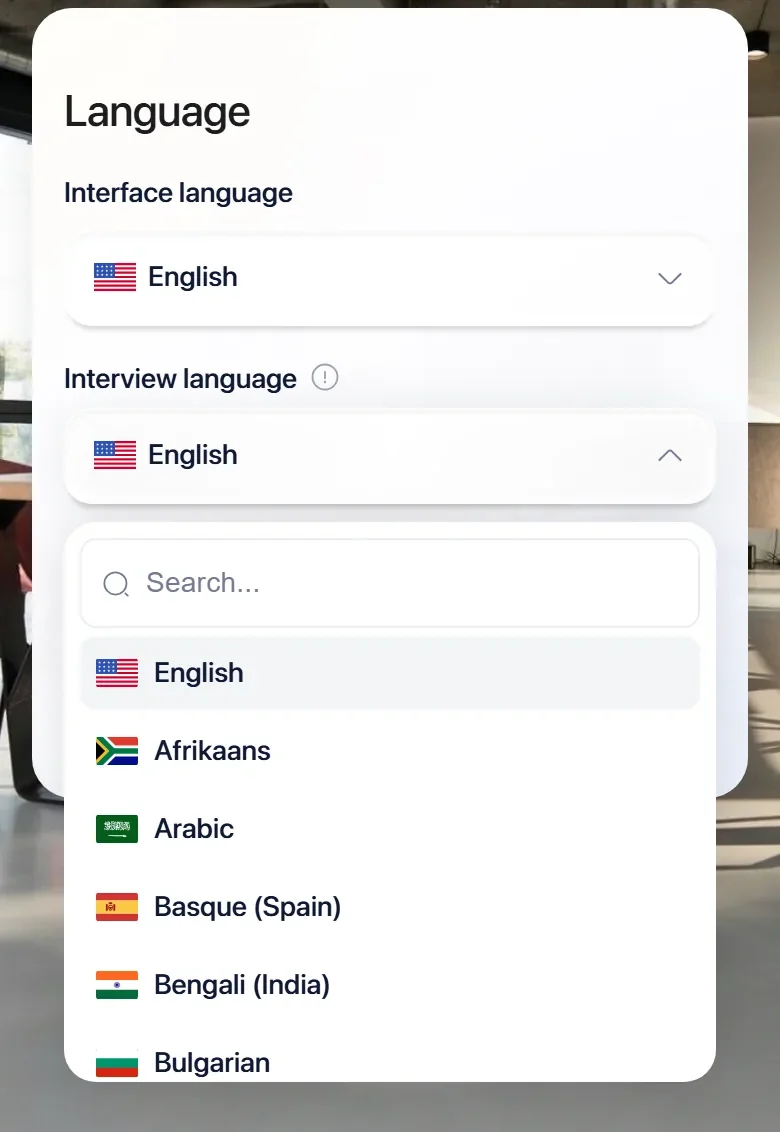
A voice option can change the access requirements of the initial screen. Test it with the actual role and language rather than assuming that every platform language is equally supported in every mode. Explain when the interview is recorded and what a candidate can do if the default format does not work for them. Keep an accommodation route visible before the assessment starts.
When comparing invitations, look at the completed journey. Flowmingo’s WhatsApp option is a paid, enabled-organization invitation channel using messaging credits; it opens the browser interview. BrightHire’s ATS-triggered invitation should be tested for timing, duplicate invitations and how the recruiter handles an applicant who has already completed the screen[1].
| What | BrightHire | |
|---|---|---|
| Timing | Candidate completes the AI screen asynchronously[1] | Applicant completes the interview in their own time |
| Device | Any device including mobile; no app or login advertised[1] | Phone or laptop browser, with camera and microphone checks for the AI video interview |
| Voice option | Voice-only AI screening advertised[1] | Standard async AI interview is a video-answer workflow |
| Language | Platform advertises 30+ languages; verify selected Screen language[2] | 60+ spoken interview languages; applicants choose from those you allow |
| Invitation | Direct invitation or automatic ATS-stage trigger[1] | Email invitations and reminders; WhatsApp invitations for enabled, eligible paid organizations, with messaging credits |
| Candidate information | Configurable introductions, FAQs and messaging[1] | Use clear role instructions and a support contact |
| Human recording | Live-interview recording notification and opt-out controls[5] | Confirm Companion installation and consent setup separately |
What comes back after each interview
After a Screen interview, BrightHire describes rubric-based scores, rankings, summaries, transcripts and audio playback. When paired with Interview Intelligence, screening and human-interview records can sit together. Flowmingo’s core report combines the recorded answer, transcript and written evaluation[1,2].
| What | BrightHire | |
|---|---|---|
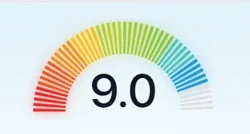
| Score | Rubric-based scoring and candidate ranking[1] | Criterion scores with written reasons; overall score reflects the importance you assign |
| Summary | Structured screening summary[1] | Strengths, gaps, recommendation and answer-level evidence for recruiter review |
| Original conversation | Transcript and audio playback[1] | Recording and transcript alongside criterion scores and written reasons |
| Cross-stage context | Screens and captured human interviews together[2] | AI interview evidence plus qualified Companion workflow |
| Video evaluation | Vendor says it does not use AI to evaluate video[2] | Review criterion reasons against the candidate’s answers |
| Sharing | Clips, playlists and collaboration appear in Teams tier[2] | Report links on Free; downloads and branded sharing on paid plans; CSV export on Growth |
| Hiring decision | Human decision-making remains part of the workflow[2] | Recruiters review the evidence and decide who moves forward |


 Overall score
Do not confuse a broader candidate record with a better individual score. A combined record is useful when later interviewers can see what was already established and focus on unresolved questions. It can also create anchoring if an early AI score is shown without the supporting answer. Decide which reviewers see each score and when, and require the hiring manager to inspect evidence for any consequential disagreement.
Integrations and workflow
| What | BrightHire | |
|---|---|---|
| Screen ATS workflow | Greenhouse, Ashby, Workday and SmartRecruiters advertised[1] | API, webhooks and MCP for custom integrations on every plan |
| Meeting platforms | Zoom, Google Meet and Teams connections[4] | Companion supports recruiter-led browser calls; confirm availability |
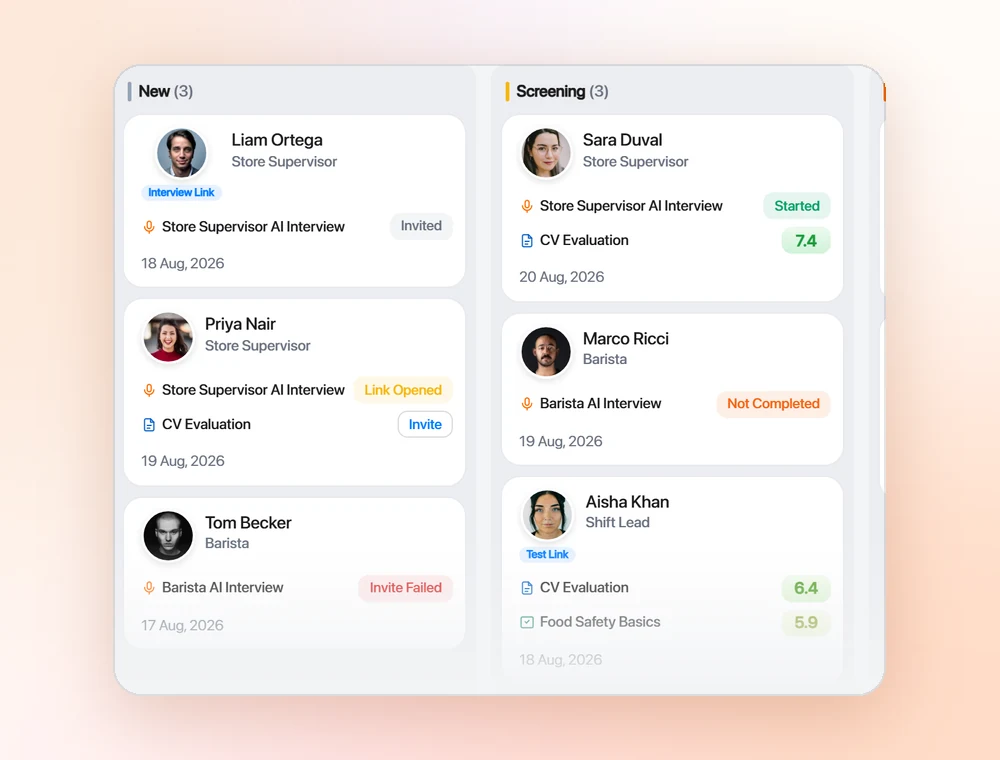
| Candidate tracking | BrightHire integrates with the existing ATS[4] | Built-in applicant tracking, hiring stages, notes and team review |
| Team permissions | Configurable access and SSO in applicable tiers[2] | Unlimited team members; Owner, Admin and Member roles |
| Interview planning | Planning and agent tools vary by package[2] | Configure questions and criteria within the hiring project |
| Program reporting | Interview quality and custom reporting vary by tier[2] | Review candidate evidence and hiring stages in the workspace |
Demonstrate the integration at the point a recruiter uses it. A hiring manager should be able to find the relevant answer, not merely a completion flag. BrightHire advertises scorecards and playable highlights through ATS integrations; confirm which are in the proposed tier[4]. Flowmingo offers custom integration interfaces on every plan, but the same field mapping and permission checks are still necessary.
Scoring, oversight and candidate data
Recording controls and human oversight belong in the pilot
BrightHire publishes consent, opt-out, retention and role-based access controls. It also describes security and bias-audit work. These are vendor statements that should be checked against the applicable reports and contract, rather than treated as a guarantee that every employer use is compliant[5].
Test the controls using ordinary recruiter permissions. Confirm what happens when a candidate opts out, when a reviewer leaves the company and when the retention period ends. Ask for the scope and date of any audit, including whether it covers the Screen product and the configuration being proposed. A security badge and a fairness study address different questions and should not be substituted for one another.
| What | BrightHire | |
|---|---|---|
| Consent | Pre-interview and in-interview notice; opt-out controls[5] | Review candidate information and the applicable recording workflow |
| Retention | Configurable retention advertised[5] | Free retains the latest 300 interview videos for 30 days; scores and transcripts remain available |
| Access | Role-based permissions and identity-provider support[5] | Unlimited team members; Owner, Admin and Member roles |
| Model training | Vendor says customer data does not train external AI models[5] | Review applicable data-processing terms |
| Audit evidence | Vendor describes third-party AI bias auditing[5] | Request current certification and assessment evidence for your requirements |
| Decision oversight | AI supports human decision-making[2] | Recruiters review the evidence and decide who moves forward |
Which should you choose?
| If you are | Pick | Why |
|---|---|---|
| You already use BrightHire and want AI screening in the same record | BrightHire | Screen can be paired with Interview Intelligence and its planning context[2]. |
| You need an ongoing free AI interview allowance | Flowmingo | Core AI interviews and team members are unlimited on Free. |
| Voice-only AI screening is essential | BrightHire | BrightHire Screen explicitly advertises a voice-only option[1]. |
| Your main need is organization-wide interview coaching and insights | BrightHire | The broader platform advertises these capabilities by tier[2]. |
| You need interview evidence with an included hiring pipeline | Flowmingo | The tracker and review workflow are included. |
| You need both AI and recruiter-led interviews | Either | Compare BrightHire’s package with Flowmingo’s AI interview and qualified Companion availability; do not assume identical scope. |
Moving from BrightHire: test one role first
Pilot the first-round interview and the later human-interview handoff separately. This makes it clear whether the benefit comes from automated screening, better interview operations or both.
- Define the package being comparedRecord whether the BrightHire proposal includes Screen alone or Interview Intelligence. List the required planning, coaching and integration features.
- Calibrate a shared interview rubricUse the same role requirements and answer examples. Approve generated questions and test how each agent handles an unclear answer.
- Review evidence across stagesCheck that hiring managers can find the original answer and distinguish screening evidence from later interview notes.
- Verify consent, access and priceTest an opt-out and a permission change. Confirm Screen volume, reviewer seats and any tier needed for the planned reporting workflow.
Pilot it on 1 role this week. Unlimited AI interviews in 60+ languages, for $0.
Start Hiring FreeThe full comparison, point by point
For the procurement checklist: all 40 points, with a source on each. Open a group.
Price and plan limits7 points
| What | BrightHire | |
|---|---|---|
| Screen rate | Custom quote based on volume, roles and business needs[1] | Free US$0; Starter US$49/month; Growth US$99/month; AI interviews stay unlimited |
| Screen packaging | Standalone or paired with Interview Intelligence[2] | Core AI interviewing included on every plan |
| Intelligence tiers | Recruiters, Teams and Enterprises packages[2] | Confirm Companion availability and terms separately |
| Setup charges | Vendor states no additional Screen setup fee[1] | Self-service hiring-project setup |
| Interview allowance | Confirm included volume and overage terms in quote[1] | Unlimited AI interviews |
| Team allowance | Confirm seats and package entitlements[2] | Unlimited team members; Owner, Admin and Member roles |
| Free access | No ongoing Screen free allowance established on reviewed pages[1,2] | Ongoing Free plan with no trial deadline |
The interview7 points
| What | BrightHire | |
|---|---|---|
| Interviewer | AI agent runs the first-round screen[1] | Spoken AI questions and follow-ups; applicants record video answers in their own time |
| Setup context | Job description, rubric and planning documents[1] | Generate 1-30 questions from the job description, then edit questions and evaluation criteria |
| Approval | Recruiter approves interview questions before use[1] | Recruiter edits questions and criteria before invitation |
| Follow-ups | Generated follow-up and probing logic for the role[1] | AI follows up on applicant answers |
| Format choice | Voice-only or video according to configuration[1] | Standard AI interview captures video answers to spoken prompts |
| Interview length | Configure length, tone and focus[1] | Configure the interview duration, up to 60 minutes depending on your plan |
| Human interview support | Separate Interview Intelligence tools for live interviews[3] | Interview Companion supports recruiter-led browser calls; confirm installation and availability for your team |
Candidate experience7 points
| What | BrightHire | |
|---|---|---|
| Timing | Candidate completes the AI screen asynchronously[1] | Applicant completes the interview in their own time |
| Device | Any device including mobile; no app or login advertised[1] | Phone or laptop browser, with camera and microphone checks for the AI video interview |
| Voice option | Voice-only AI screening advertised[1] | Standard async AI interview is a video-answer workflow |
| Language | Platform advertises 30+ languages; verify selected Screen language[2] | 60+ spoken interview languages; applicants choose from those you allow |
| Invitation | Direct invitation or automatic ATS-stage trigger[1] | Email invitations and reminders; WhatsApp invitations for enabled, eligible paid organizations, with messaging credits |
| Candidate information | Configurable introductions, FAQs and messaging[1] | Use clear role instructions and a support contact |
| Human recording | Live-interview recording notification and opt-out controls[5] | Confirm Companion installation and consent setup separately |
Reports and evaluation7 points
| What | BrightHire | |
|---|---|---|
| Score | Rubric-based scoring and candidate ranking[1] | Criterion scores with written reasons; overall score reflects the importance you assign |
| Summary | Structured screening summary[1] | Strengths, gaps, recommendation and answer-level evidence for recruiter review |
| Original conversation | Transcript and audio playback[1] | Recording and transcript alongside criterion scores and written reasons |
| Cross-stage context | Screens and captured human interviews together[2] | AI interview evidence plus qualified Companion workflow |
| Video evaluation | Vendor says it does not use AI to evaluate video[2] | Review criterion reasons against the candidate’s answers |
| Sharing | Clips, playlists and collaboration appear in Teams tier[2] | Report links on Free; downloads and branded sharing on paid plans; CSV export on Growth |
| Hiring decision | Human decision-making remains part of the workflow[2] | Recruiters review the evidence and decide who moves forward |
Integrations and team6 points
| What | BrightHire | |
|---|---|---|
| Screen ATS workflow | Greenhouse, Ashby, Workday and SmartRecruiters advertised[1] | API, webhooks and MCP for custom integrations on every plan |
| Meeting platforms | Zoom, Google Meet and Teams connections[4] | Companion supports recruiter-led browser calls; confirm availability |
| Candidate tracking | BrightHire integrates with the existing ATS[4] | Built-in applicant tracking, hiring stages, notes and team review |
| Team permissions | Configurable access and SSO in applicable tiers[2] | Unlimited team members; Owner, Admin and Member roles |
| Interview planning | Planning and agent tools vary by package[2] | Configure questions and criteria within the hiring project |
| Program reporting | Interview quality and custom reporting vary by tier[2] | Review candidate evidence and hiring stages in the workspace |
Oversight and candidate data6 points
| What | BrightHire | |
|---|---|---|
| Consent | Pre-interview and in-interview notice; opt-out controls[5] | Review candidate information and the applicable recording workflow |
| Retention | Configurable retention advertised[5] | Free retains the latest 300 interview videos for 30 days; scores and transcripts remain available |
| Access | Role-based permissions and identity-provider support[5] | Unlimited team members; Owner, Admin and Member roles |
| Model training | Vendor says customer data does not train external AI models[5] | Review applicable data-processing terms |
| Audit evidence | Vendor describes third-party AI bias auditing[5] | Request current certification and assessment evidence for your requirements |
| Decision oversight | AI supports human decision-making[2] | Recruiters review the evidence and decide who moves forward |
Questions buyers ask
Is BrightHire just an AI notetaker?
No. BrightHire Screen is a separate autonomous AI interviewer. Interview Intelligence supports human interviews, and the two can be purchased together[1,2].
Can BrightHire Screen be purchased alone?
Yes. Its current pricing page says Screen can be used independently or paired with Interview Intelligence. Numeric pricing requires a quote[2].
Does BrightHire Screen support voice-only interviews?
Yes. It advertises voice-only or video interviews depending on role and configuration, completed asynchronously[1].
Does Flowmingo support recruiter-led interviews?
Flowmingo has an Interview Companion for recruiter-led browser calls, with installation and availability to confirm for your team. This is separate from the standard AI interview and should not be assumed to have the same plan entitlement.
Sources and method
This comparison was updated on 4 Oct 2026. Competitor claims link to BrightHire's own pages or a named third party; ratings carry their own checked dates. Flowmingo facts come from our pricing, the AI Interviewer page, a sample report, our Data Processing Agreement and our Privacy Policy. Spotted something out of date? Tell us below and we fix it.
All 5 sources
- 1 BrightHire Screen AI Interviewer. brighthire.com
- 2 BrightHire current pricing and package details. brighthire.com
- 3 BrightHire AI interview notes. brighthire.com
- 4 BrightHire integrations. brighthire.com
- 5 BrightHire compliance and security controls. brighthire.com
What changed, and when
- First published comparison covering current product scope, pricing, candidate experience, evidence and hiring workflow, with first-party sources.